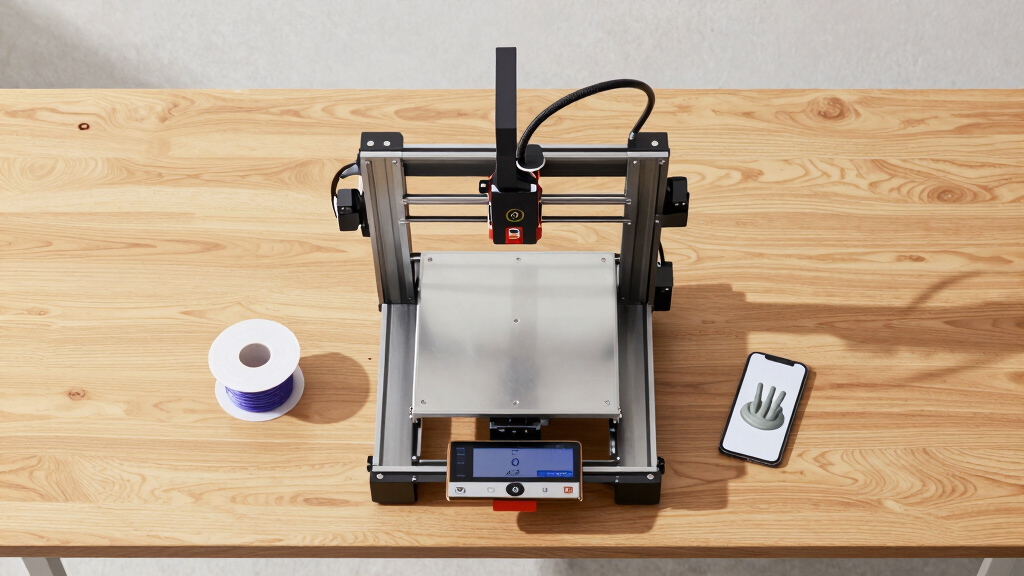
Finding the best enclosed 3D printers for classrooms involves balancing safety, ease of operation, and print quality. The FlashForge AD5M Pro stands out for its high speed and precision, making it ideal for dynamic learning environments. For those prioritizing multi-material support, the QIDI Q2C offers impressive versatility with auto-leveling and high-temperature capabilities. Meanwhile, the Bambu Lab P1S combines a fully enclosed design with fast, high-precision printing suitable for larger projects. The main challenge for educators is choosing a model that offers safety without sacrificing print quality or speed. Continue reading to see how these options compare and which one fits your classroom best.
Key Takeaways
- Enclosed design significantly enhances safety, reducing risks of burns and fumes in classroom settings.
- Speed and print volume are key tradeoffs; faster printers like the Bambu Lab P1S excel in throughput but may be noisier or more expensive.
- Multi-material support and high-temperature hotends expand project possibilities but often come with higher costs and maintenance needs.
- Ease of use, including auto calibration and touchscreen interfaces, is critical for classroom environments with varied user skill levels.
- Build volume varies widely; selecting the right size depends on the scope of projects and available classroom space.



More Details on Our Top Picks
FlashForge AD5M Pro 3D Printer – High Speed & Precision, Auto Calibration, CoreXY Structure, Quiet Operation
The FlashForge AD5M Pro stands out as the most balanced choice for classrooms due to its combination of speed, precision, and safety features. Its automatic bed calibration simplifies setup, making it accessible to educators without extensive technical backgrounds, unlike the more complex QIDI Q2C. The enclosed design with HEPA air filtration ensures a safer environment for students, while its multi-material support offers versatility for various projects. However, its weight and higher price might limit portability and budget-conscious schools. Compared to the Bambu Lab P1S, this model is less focused on ultra-fast speeds but offers more comprehensive safety and multi-material options. This pick makes the most sense for schools that want reliable, versatile printing with minimal setup fuss.
Pros:- Fast printing speed up to 600mm/s for efficient classroom projects
- Automatic bed leveling simplifies setup and reduces student handling errors
- Enclosed design with air filtration enhances safety and indoor air quality
- Supports multiple filament types for diverse educational activities
Cons:- Relatively heavy at 33 pounds, making it less portable
- Complex setup may require some technical knowledge or training
Best for: Educational institutions seeking a reliable, multi-material capable printer with safety features and ease of use.
Not ideal for: Schools with limited space or tight budgets, since the unit is relatively heavy and expensive.
- Dimensions:15.75 x 17.83 x 14.96 inches
- Weight:33 pounds
- Nozzle Sizes:0.25mm, 0.4mm, 0.6mm, 0.8mm
- Max Nozzle Temperature:280°C
- Noise Level:≤50 dB
- Filament Compatibility:TPU, ASA, PLA, ABS, PETG, PLA-CF, PETG-CF
Bottom line: Ideal for schools that need a versatile, safe, and relatively fast printer with minimal fuss.
QIDI Q2C 3D Printer, Enclosed FDM with Auto Leveling, High-Speed 600mm/s, 270x270x256mm Build Volume, 370°C Hotend, Multi-Material Support
The QIDI Q2C is tailored for classrooms aiming for high-precision, multi-material projects. Its robust metal CoreXY structure provides stability at impressive speeds up to 600mm/s, surpassing many competitors like the FlashForge AD5M Pro in raw speed, though this comes with increased complexity. The auto-leveling feature ensures reliable first layers, crucial for student projects, while the high-temperature hotend expands the range of materials students can explore—ideal for advanced classes. The larger size and weight, however, may require dedicated space, and its high-end features might intimidate beginners. Compared with the Creality K2 Pro, the QIDI Q2C emphasizes precision and material diversity over speed for larger builds. This printer fits well into educational environments where high-quality output and material flexibility are priorities.
Pros:- High-precision results with stable CoreXY design
- Supports high-temperature materials and multi-material printing
- Quick setup within 15 minutes and user-friendly interface
- Large build volume for bigger projects
Cons:- Relatively large and heavy, requiring ample space
- Higher price point limits budget flexibility
- Complex features may require technical training
Best for: Advanced classroom settings focused on professional-quality, multi-material, and high-speed printing.
Not ideal for: Schools with space constraints or beginners who might find setup and operation overwhelming.
- Dimensions:19 x 21 x 23 inches
- Weight:39.4 pounds
- Build Volume:270x270x256 mm
- Max Hotend Temperature:370°C
- Print Speed:Up to 600mm/s
- Material Compatibility:PLA, ABS, PETG, TPU, PA, PC, carbon/glass-fiber composites
Bottom line: Best suited for schools needing high-precision, multi-material capabilities with fast, reliable operation.
3D Printer for Kids, AI-Powered Fully Assembled 3D Printer with Up to 400mm/s Speed, Auto Leveling, 1500+ Models & 16+ Modules, Includes 8 PLA Filaments
The AOSEED X-MAKER JOY AI+ is designed to make 3D printing accessible and fun for children and beginners. Its fully enclosed, safety-focused design paired with auto-leveling ensures a user-friendly experience, unlike more complex printers such as the QIDI Q2C. The large library of models and easy one-tap printing make it ideal for classroom activities where engagement is key. The built-in camera and real-time monitoring features foster a sense of control and creativity among students. However, this ease of use comes at a higher price point, and it’s limited mostly to PLA filament, restricting some experimental possibilities. Compared with the Creality K2 series, it emphasizes simplicity and safety over large build sizes or multi-color capabilities. This printer makes sense for early education and makerspaces focused on creativity without technical hurdles.
Pros:- Easy setup with one-tap operation ideal for young students
- Fast speeds up to 400 mm/s enhance project turnaround
- Large model library and modules for diverse creative projects
- Real-time monitoring and sharing capabilities
Cons:- Higher cost compared to basic beginner printers
- Limited filament options in the kit restrict experimentation
- May require a compatible smart device for full features
Best for: Elementary and middle school environments prioritizing safety, ease, and creative engagement.
Not ideal for: Advanced classes or projects requiring high-temperature materials or large build sizes.
- Dimensions:11.42 x 10.63 x 12.2 inches
- Weight:8.82 pounds
- Max Speed:up to 400 mm/s
- Precision:0.05 mm
- Filament:8 PLA filaments included
- Build Volume:1500+ models, 16+ modules
Bottom line: Perfect for schools focused on introducing young learners to 3D printing in a safe, simple, and engaging way.
Creality K2 Pro Combo 3D Printer, Multicolor Printing, Auto Leveling, 600mm/s Speed, Large Build Volume 300×300×300mm
The Creality K2 Pro Combo offers impressive speed and size, making it a strong candidate for educational settings that need to produce large models or multiple prototypes quickly. Its support for multicolor and multi-material printing via the CFS system provides creative flexibility, especially compared to single-material printers like the AOSEED. The high speed up to 600mm/s significantly reduces printing times, a major benefit for classrooms with tight schedules. The auto bed leveling simplifies setup, though its size and weight mean it requires dedicated space. Compared with the smaller K2, this model is better suited for large projects, but its complexity and cost might be overwhelming for beginners or schools with limited budgets. It excels in environments prioritizing large, multi-material output over compactness or simplicity.
Pros:- Supports multicolor and multi-material printing with CFS system
- Large build volume suitable for big projects
- High-speed printing up to 600mm/s saves time
- Auto bed leveling for consistent first-layer quality
Cons:- Heavy and large, demanding space and handling
- Complex features may require training for proper operation
- Higher price point may stretch budgets
Best for: Schools needing large, multi-material, multicolor projects with high throughput.
Not ideal for: Limited space classrooms or beginners who prefer straightforward, smaller printers.
- Build Volume:300×300×300 mm
- Max Print Speed:600 mm/s
- Supported Materials:PLA, ABS, ASA, PPA-CF, PET-CF
- Item Dimensions:17 x 20 x 18 inches
- Item Weight:61.6 pounds
- Auto Leveling:Yes
Bottom line: Best for environments that need large-scale, multi-material production with fast turnaround times.
Creality K2 Combo 3D Printer, Multicolor Printing with CFS, Max 600mm/s Speed, Auto Leveling & AI Camera, 260x260x260mm Build Volume
The Creality K2 Combo combines high-speed multicolor printing with smart features like AI camera monitoring, making it suitable for classrooms that prioritize innovation and real-time oversight. Its ability to support up to 16 colors using four CFS units offers unparalleled creative possibilities, especially for complex projects. The auto-leveling paired with an AI camera allows for quick setup and remote supervision, reducing teacher workload and enhancing student independence. However, the need for multiple CFS units and the maximum speed may be excessive for simpler projects or smaller classrooms. Compared to the K2 Pro, this model emphasizes real-time monitoring and multicolor output over larger build size. This printer appeals to tech-forward schools aiming to incorporate advanced digital workflows and multi-material creativity.
Pros:- Supports up to 16 colors with four CFS units for complex projects
- AI camera enables real-time remote monitoring and control
- Pre-assembled, quick setup ideal for busy classrooms
- Quiet operation with step-servo motors enhances classroom environment
Cons:- Requires multiple CFS units for full multicolor capability, increasing cost
- Maximum speed of 600mm/s may be unnecessary for many educational projects
- Limited filament options compared to multi-material systems
Best for: High-tech classrooms and creative spaces focused on multicolor, multi-material, and real-time project management.
Not ideal for: Schools with limited space or those seeking straightforward, single-material printers for basic tasks.
- Build Volume:260 x 260 x 260 mm
- Max Printing Speed:600 mm/s
- Color Capabilities:Up to 16 colors with 4 CFS units
- Auto Leveling:Yes, with AI camera
- Supported Materials:PLA, PETG, ABS, PLA-CF
- Pre-assembled:Yes
Bottom line: Best suited for schools integrating high-tech features, multicolor creativity, and remote supervision into their curriculum.
Prusa CORE One 3D Printer Kit, Removable Print Sheets, Automatic Calibration, Beginner-Friendly, DIY Assembly, Print Size 9.8 x 8.6 x 10.6 in
The Prusa CORE One stands out as the most balanced choice for educational settings, offering a reliable enclosed chamber combined with a user-friendly automatic calibration system. Compared with the Bambu Lab P1S, it sacrifices some speed and multi-material support but gains in simplicity and affordability, making it ideal for schools with limited technical support. Its large build volume and durable all-steel frame support a variety of projects, yet the DIY assembly process may challenge teachers or students unfamiliar with building printers. The enclosure helps control temperature and reduces fumes, while the automatic calibration minimizes setup errors, ensuring consistent results. However, the self-assembly requirement might delay deployment for less technically inclined users, and its filament compatibility is somewhat limited. Overall, this pick makes the most sense for schools seeking a dependable, beginner-friendly machine with room to grow.
Pros:- Reliable all-steel, durable construction for classroom use
- Enclosed chamber improves temperature stability and safety
- Automatic calibration simplifies setup and ongoing operation
- Large print volume accommodates diverse projects
Cons:- Requires self-assembly, which may be challenging for beginners
- Relatively heavy at 54 pounds, complicating mobility
- Limited to filament types like PLA and PETG for optimal performance
Best for: Educational institutions and classrooms needing a reliable, durable, and moderately easy-to-maintain 3D printer for students learning the basics of additive manufacturing.
Not ideal for: Schools with limited technical support or those preferring fully assembled units that require no setup, as the DIY nature could cause delays.
- Print Size:9.8 x 8.6 x 10.6 inches
- Build Volume:250×220×270 mm
- Chamber Temperature:up to 55°C
- Material Compatibility:PLA, PETG, ASA, PC, Nylon
- Frame Material:All-steel exoskeleton
- Assembly:DIY kit
- Sample Filament:Prusament PLA 2x25g
Bottom line: This model is ideal for schools seeking a dependable, beginner-friendly 3D printer that balances ease of use with durability.
Bambu Lab P1S 3D Printer, Fully Enclosed, Supports Up to 16 Colors and Multi Materials, Fast Printing at 500mm/s, High Precision, CoreXY, Auto Bed Leveling, Large Print Size
The Bambu Lab P1S excels in multi-color and multi-material printing, making it well-suited for advanced classroom projects that demand high detail and versatility. Unlike the FlashForge AD5X, which emphasizes speed and multi-color support, the P1S offers a more balanced approach with automatic bed leveling and a large build volume, though its setup might require more technical familiarity. Its ability to handle various materials, including nylon and PC, expands creative possibilities, while the fully enclosed design enhances safety and print quality. The tradeoff is its weight and size—at nearly 39 pounds—and the need for a stable workspace. While not ideal for schools without technical support, it is perfect for classrooms aiming to teach multi-material fabrication and detailed prototyping. This printer is best for educators looking for a versatile, high-quality multi-color machine capable of handling complex projects.
Pros:- Supports up to 16 colors and multiple materials for creative flexibility
- Fast printing at 500mm/s speeds accelerates project timelines
- Auto bed leveling and fully enclosed design improve print consistency and safety
- Large build volume for complex and sizable models
Cons:- Requires connection to Bambu Lab AMS for multi-color printing
- Relatively heavy and large, needing ample space and stability
- Higher price point compared to entry-level models
Best for: Advanced classrooms and teachers emphasizing multi-material, multi-color projects with high precision, where students have some prior experience or technical support.
Not ideal for: Schools seeking a simple, plug-and-play solution or those with limited space, given its weight and setup complexity.
- Product Dimensions:18.72 x 20.67 x 18.72 inches
- Item Weight:38.9 pounds
- Maximum Printing Speed:500mm/s
- Supported Colors:Up to 16
- Supported Filaments:PLA, PETG, TPU, PVA, PET ABS, ASA; Capable: PA, PC
- Auto Bed Leveling:Yes
Bottom line: This printer offers advanced multi-material capabilities for schools equipped to handle more complex setups and projects.
FLASHFORGE AD5X Multi-Color 3D Printer, CoreXY, 600mm/s High-Speed, 220x220x220mm Build Volume
The FLASHFORGE AD5X is designed for classrooms that prioritize speed and multi-color production, making it ideal for rapid prototyping or projects requiring quick turnaround. Its ability to print at up to 600mm/s surpasses most competitors, including the Bambu Lab P1S, for students who need to see results fast. Its auto bed leveling and versatile nozzle options further streamline workflows, but the high speed can sometimes compromise detail if not carefully calibrated. The relatively smaller build volume means it’s best suited for smaller models, and the complex setup might challenge less experienced users. This printer’s high speed and multi-color features make it perfect for dynamic classroom environments emphasizing efficiency. However, teachers should weigh the potential for calibration challenges against its rapid output capabilities.
Pros:- Supports multi-color printing with up to 4 colors simultaneously
- High-speed printing at 600mm/s enables rapid project completion
- Auto bed leveling and smart features simplify operation
- Versatile nozzle options for detailed or larger prints
Cons:- Complex setup and calibration process for optimal results
- High speed may impact detail and quality if not carefully managed
- Smaller build volume limits the size of projects
Best for: Educational settings requiring fast, multi-color prototyping and smaller models, especially in design or engineering courses where speed is critical.
Not ideal for: Schools or teachers seeking large-volume printing or those with limited technical support, as setup and calibration are more demanding.
- Build Volume:220x220x220mm
- Maximum Speed:600mm/s
- Extruder Temperature:300°C
- Nozzle Sizes:0.25mm to 0.8mm
- Auto Leveling:Yes
- Connectivity:Mobile app control
Bottom line: This printer suits classrooms focused on fast, multi-color prototyping where speed outweighs the need for larger build volumes.

How We Picked
To determine the best enclosed 3D printers for classrooms, I evaluated each model based on safety features, print quality, speed, ease of use, build volume, and maintenance requirements. Classroom environments demand reliable, user-friendly machines that minimize setup time and safety concerns. I prioritized printers with automatic calibration, quiet operation, and safety features like enclosed designs to protect students. Price was also a factor, balancing affordability with durability and feature set. The rankings reflect a blend of performance, safety, value, and suitability for educational settings, with the top picks excelling across these criteria.Factors to Consider When Choosing Best Enclosed 3d Printers For Classrooms
Choosing the right enclosed 3D printer for a classroom involves several key factors. Beyond basic features, understanding how safety, speed, and usability impact daily use can save time and reduce frustration. It’s also important to consider the size of projects students will work on and whether the printer’s capabilities match your curriculum needs. Making an informed decision ensures you select a machine that supports both learning and safety, while providing long-term value.Safety Features and Enclosure
Safety is paramount in a classroom setting. An enclosed design minimizes risks from hot ends, moving parts, and fumes. Look for printers with robust doors, safety interlocks, and good ventilation. Even with safety features, proper supervision and training are essential. Avoid models with open frames or exposed hot components, which can pose hazards to students and staff alike. Prioritize printers with certifications or safety standards to ensure peace of mind during daily use.
Print Speed and Volume
Speed impacts how many projects can be completed in a class session, while build volume determines the size of models students can create. Faster printers like the Bambu Lab P1S support rapid prototyping but may come at a higher price and increased noise levels. Larger build volumes enable more complex projects but often require more space and longer print times. Consider your typical project size and throughput needs to find a balance that keeps students engaged without overwhelming classroom logistics.
Ease of Use and Maintenance
Classroom printers should be straightforward to operate, with features like auto bed leveling, touchscreen controls, and simplified filament loading. Automated calibration reduces setup time and user errors, crucial when multiple students or teachers operate the machine. Maintenance should be minimal, with accessible parts and clear instructions. Choosing a model with reliable components and good customer support can prevent downtime and frustration, making it easier to integrate into lesson plans.
Material Compatibility and Hotend Capabilities
High-temperature hotends support a wider range of filaments, including ABS and specialty materials, broadening project options. Multi-material support allows for more complex, multi-color models, enriching creative possibilities. However, these features often increase cost and complexity. If your curriculum emphasizes diverse materials or multi-color designs, investing in a versatile hotend makes sense. For basic projects, simpler setups can reduce overall costs and maintenance.
Budget and Long-Term Value
While upfront cost matters, consider the total cost of ownership, including filament, maintenance, and potential repairs. Cheaper models may save money initially but could require frequent replacements or repairs. Conversely, investing in a slightly pricier, more durable machine can offer better reliability and lower ongoing costs. Evaluate whether the added features and build quality justify the price, especially if the printer will see regular classroom use over years.
Frequently Asked Questions
Are enclosed 3D printers safe for younger students?
Enclosed 3D printers are generally safer for younger students because they contain moving parts and hot components within a protective barrier. This design reduces the risk of accidental burns or contact with hot nozzles. However, supervision remains critical, and students should be trained on safe operation. Additionally, choosing models with safety certifications and interlocks enhances safety standards in the classroom.
How important is print speed in a classroom setting?
Print speed can significantly impact classroom productivity, especially when students are working on multiple projects. Faster printers allow for more rapid iteration and less downtime, which keeps lessons flowing smoothly. However, extremely high speeds might compromise print quality or increase noise levels. Balancing speed with reliability and print quality is key to ensuring the printer supports your teaching goals without creating disruptions.
Do I need a multi-material 3D printer for classroom projects?
Multi-material printers expand creative options by enabling multi-color and composite prints, making projects more engaging. If your curriculum involves complex models, detailed prototypes, or color coding, a multi-material setup offers clear advantages. However, these printers tend to be more expensive and require more maintenance. For basic educational projects, single-material printers often suffice and are easier to operate.
What maintenance should I expect with enclosed 3D printers?
Routine maintenance includes cleaning the print bed, checking for filament clogs, and updating firmware. Enclosed printers generally require less frequent cleaning of exposed parts, but the hotend and cooling fans still need attention. Regular calibration ensures consistent print quality, especially in a classroom environment where multiple users operate the machine. Choosing a model with accessible components and clear support resources can simplify ongoing maintenance tasks.
Is it worth investing in a high-end enclosed 3D printer for a classroom?
Investing in a higher-end model often means better reliability, faster speeds, and enhanced safety features, which are valuable in a classroom. These printers can handle more complex projects and support a wider range of materials. However, they come at a higher initial cost and may require more technical expertise to operate and maintain. For schools with frequent use and advanced project needs, the long-term benefits can justify the investment.
Conclusion
For classrooms prioritizing safety and ease of use, the FlashForge AD5M Pro offers a balanced mix of reliability and quality, making it the best overall choice. Schools seeking versatility and multi-material capabilities should consider the QIDI Q2C for its multi-material support and high-temperature hotend. Those with larger project sizes or a need for speed might find the Bambu Lab P1S the best fit, thanks to its large volume and rapid printing. Beginners or budget-conscious educators should look at simpler, more straightforward models, while advanced programs may benefit from premium options with multi-material support and faster speeds. Matching the printer to your specific needs ensures a smoother, safer, and more productive classroom experience.