🔍 Read the full analysis: 10 Best 3D Printers For Colorful Everyday Projects In 2027 on ThorstenMeyerAI.com

Prime made for students and young adults
- Fast, free delivery for dorm and study essentials
- Prime Video and Amazon Music included
- Member-only deals
TL;DR
This is a buyer’s guide, not a report of a newly announced product or independently verified test results. It compares 10 3D printers for everyday projects, with the Bambu Lab P2S Combo presented as the broadest bundled option and other models aimed at more specific needs. Actual print speed, quality, waste, and upkeep depend on the printer, materials, settings, and workflow.
A buyer’s guide to 10 3D printers for colorful everyday projects, as detailed in the original analysis, names the Bambu Lab P2S Combo its top general-purpose pick, citing its enclosed printer and included multicolor material system. The comparison also highlights more accessible open-frame options, a four-toolhead design, and models focused on speed or alternative multicolor workflows—but it does not provide controlled test results or establish that one printer is best for every buyer.
The guide recommends choosing by materials, workspace, and typical projects, rather than headline speed or color count alone, a focus also reflected in this home-use 3D printer guide. Its leading pick, the P2S Combo, pairs an enclosed printer with bundled material-handling hardware. The guide presents the Bambu Lab A1 Combo as a more approachable hobbyist option, and the Snapmaker U1 as a distinct choice for buyers interested in four toolheads.
It distinguishes the Bambu Lab P1S and P1S Combo: the standalone P1S is for someone seeking an enclosed printer without bundled multicolor hardware, while the Combo adds an automatic material system. The Bambu Lab A1 and A1 Combo are open-frame alternatives whose suitability depends on the materials and conditions in a buyer’s workspace.
The other models named are the Flashforge Adventurer 5M, Anycubic Kobra X, Anycubic Kobra S1, Anycubic Kobra 3 V2 Combo, and Creality K2 Combo, alongside options covered in this guide to engineering 3D printers. The source characterizes the Adventurer 5M as speed-focused and groups the Kobra and K2 options as different routes to multicolor printing. It does not provide model-by-model measurements, prices, or standardized test results in the supplied material.
The 10 picks
- 1
 Snapmaker U1 3D Printer with 4-Toolhead and 5-Second Tool ChangerView on Amazon →
- 2
 Bambu Lab P2S Combo – P2S 3D Printer with AMS 2 Pro (Multi‑Color)View on Amazon →
- 3
 Bambu Lab P1S Combo 3D Printer with AMS – Multi‑Color PrintingView on Amazon →
- 4
 Creality K2 Combo 3D Printer, Multicolor Printing, Max 600mm/s Speed, Auto Le…View on Amazon →
- 5
 Bambu Lab A1 Combo + LED Lamp Kit (with AMS Lite)View on Amazon →
- 6
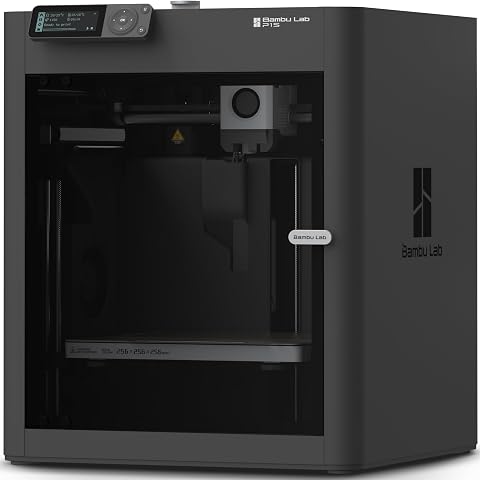 Bambu Lab P1S 3D PrinterView on Amazon →
- 7
 Anycubic Kobra X Multicolor 3D PrinterView on Amazon →
- 8
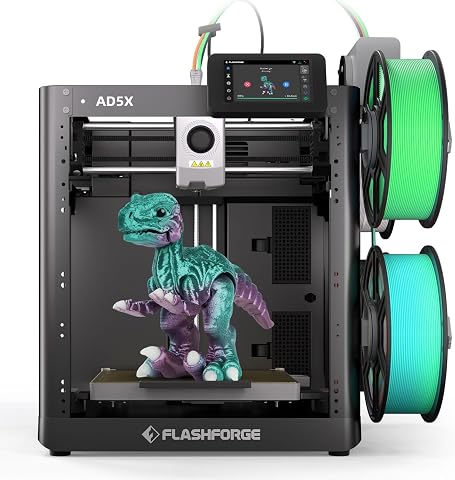 Flashforge AD5X Multi-Material 3D PrinterView on Amazon →
- 9
 Bambu Lab A1 FDM 3D PrinterView on Amazon →
- 10
 FLASHFORGE Adventurer 5M 3D Printer, All-Metal CoreXY, 600mm/s Max TravelView on Amazon →
Choosing a Printer That Fits the Work
The comparison matters because multicolor printing adds workflow tradeoffs, not just visual options. Systems that switch filament can add time and purge waste, especially when prints use several colors across layers; a four-toolhead design handles material changes differently. The source gives no comparative waste measurements, so buyers should treat those points as considerations rather than quantified outcomes.
Enclosure and speed also depend on use. An enclosure can help control drafts and temperature for some materials, but takes up space and may call for ventilation. Open-frame models can be convenient for common hobby projects. Maximum movement speed does not establish how quickly a detailed object will print at an acceptable finish. A buyer making mostly single-color parts may get more practical value from a simpler setup than from extra color hardware.
Popular right now

Samsung 65-Inch M70H Series 4K Mini LED Smart TV (2026)

Bose QuietComfort Wireless Noise Cancelling Headphones, Ice Blue

Samsung 48-Inch S90F OLED 4K Smart TV (2025)
As an affiliate, we earn on qualifying purchases.
How the Guide Compares These Models
The source says it compared print-system design, material handling, enclosure, setup, maintenance, and versatility. It gave extra weight to whether multicolor hardware is included, and separated enclosed CoreXY printers from open-frame machines rather than ranking only by speed. The stated order favors general-purpose usefulness before narrower strengths.
That framework is useful as a buying checklist, but the supplied material does not identify independent reviewers, test conditions, or a measurement method for print quality and speed. The ranking should be read as the source’s editorial assessment, not as a verified lab comparison. Needs can also change the order: a lower-ranked machine may be a better match for a particular workspace or project.
“The P2S Combo ranks first as the most complete general-purpose bundle in this group.”
— ThorstenMeyerAI.com buyer’s guide
What the Comparison Does Not Establish
The supplied source does not include prices, independent test results, print samples, or dated specifications for the 10 machines. It is not clear when the models were tested or whether all configurations discussed are available in every market in 2027. The source also does not give a full model-by-model comparison of build volume, materials, noise, reliability, or maintenance costs.
Its discussion of speed, waste, and print quality is guidance about factors buyers should weigh, not a measured comparison among these models. Product bundles and specifications can change, so the ranking should not substitute for checking current manufacturer details and local pricing before purchase.
Check Current Specs Before Buying
Buyers should compare the exact printer and bundle configuration currently offered, including whether a multicolor material system is included or sold separately. Next, measure the available workspace, check material compatibility and ventilation needs, and consider whether typical prints actually benefit from multiple colors.
For a shortlist, compare current manufacturer specifications and independent reviews that disclose their test settings. Until such evidence is supplied for this ranking, the model order remains an editorial recommendation, and real-world performance for a particular project is still dependent on materials, settings, and use.
Key Questions
Which printer does the guide rank first?
The guide ranks the Bambu Lab P2S Combo first as a general-purpose package, pointing to its enclosed printer and included multicolor material system. That is the guide’s assessment, not an independently verified test result in the supplied material.
Is a multicolor printer worth buying for everyday projects?
It depends on how often projects need color changes. Multicolor printing can add labels or decorative details, but filament switching can increase print time and purge waste. Buyers who mostly make single-color parts may prefer a simpler printer.
What is the difference between the P1S and P1S Combo?
According to the guide, the P1S is the enclosed printer without bundled multicolor hardware, while the P1S Combo adds an automatic material system.
Does the source prove which printer is fastest?
No. It describes the Adventurer 5M as emphasizing fast CoreXY printing, but the supplied material includes no standardized speed measurements or test conditions for comparing all 10 models.
Source: ThorstenMeyerAI.com