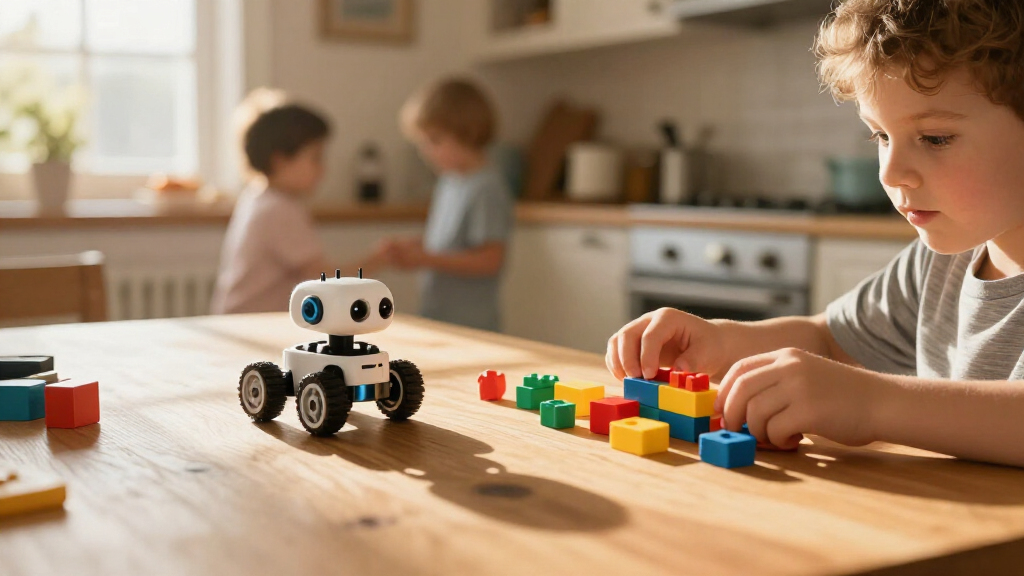
The best coding robots for kids turn programming into something children can see and control, but the right choice depends on age, patience, and whether they want to build or start coding right away. Makeblock mBot2 is my best overall pick for its path from Scratch to Python, while Botley 2.0 stands out for screen-free, beginner-friendly play and Ozobot Evo for combining color-code activities with app-based options. The biggest tradeoff is between quick, accessible play and kits that offer more building depth or advanced coding but ask more of the child. I compared all 15 options for learning progression, setup demands, versatility, and fit for different ages. Read on for the full breakdown and help matching a robot to your child’s interests.

Prime made for students and young adults
- Fast, free delivery for dorm and study essentials
- Prime Video and Amazon Music included
- Member-only deals
Key Takeaways
- mBot2 leads for long-term learning: Its Scratch and Python support gives it a clearer path from visual programming to text-based coding than the screen-free Botley options.
- Botley 2.0 favors easy entry: It is a strong match for children who are not ready for a screen or a construction project, though its simpler coding approach offers less room for advanced programming.
- The lineup splits between ready-to-play and build-first: Dash, Botley, and Ozobot options are geared toward coding an assembled robot, while Mech-5, Apitor Robot J, and ELEGOO’s car kit add substantial construction work.
- More programming modes can mean more setup: Products with Scratch, Python, apps, or hardware components offer broader projects but may require more adult help than basic button- or card-based coding.
- Age labels do not tell the whole story: A child’s tolerance for instructions, small parts, screen use, and troubleshooting can matter more than the age range printed on the box.
| Learning Resources Botley 2.0 Coding Robot Activity Set |  | Best Overall for Screen-Free Beginners | Brand: Learning Resources | Model: LER2938 | Age range: 5–10 years | VIEW LATEST PRICE | See Our Full Breakdown |
| Makeblock mBot STEM Coding Robot Kit for Kids Ages 8–12 | 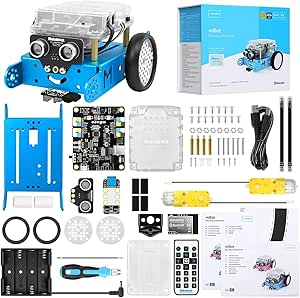 | Best for Growing into Electronics and Coding | Brand: Makeblock | Model: 90053 | Age range: 8 years and up | VIEW LATEST PRICE | See Our Full Breakdown |
| Ozobot Ozo at Home STEM Coding Robot Kit for Kids Ages 5+ |  | Best for a Guided Screen-to-Blockly Progression | Brand: Ozobot | Model number: 70101KIT | Recommended age: 5 years and up | VIEW LATEST PRICE | See Our Full Breakdown |
| Thames & Kosmos My Robotic Pet: Coding Chameleon Robotics Kit |  | Best Screen-Free Build-and-Play Project | Brand: Thames & Kosmos | Model number: 620507 | Recommended age: 8–12 years | VIEW LATEST PRICE | See Our Full Breakdown |
| Teach Tech Mech-5 STEM Coding Robot Building Kit |  | Best for Mechanical Coding and Patient Builders | Brand: Teach Tech | Model number: TTC-895 | Age range: 10 years and up | VIEW LATEST PRICE | See Our Full Breakdown |
| Learning Resources Botley the Coding Robot, 45-Piece Set |  | Best Screen-Free Starter | Brand: Learning Resources | Model: LER2936 | Recommended age: 5–8 years | VIEW LATEST PRICE | See Our Full Breakdown |
| ELEGOO UNO R3 Smart Robot Car Kit V4 with Camera |  | Best for Teen Builders | Brand: ELEGOO | Model: US-EL-KIT-012 | Controller: UNO R3 | VIEW LATEST PRICE | See Our Full Breakdown |
| Wonder Workshop Dash Coding Robot for Kids Ages 6+ |  | Best App-Guided Beginner | Brand: Wonder Workshop | Recommended age: 6 years and up | Coding apps: Five apps for Apple iOS, Android OS, and Fire OS | VIEW LATEST PRICE | See Our Full Breakdown |
| Makeblock mBot2 Coding Robot – Scratch & Python Programming Kit for Kids (Ages 8–14) | 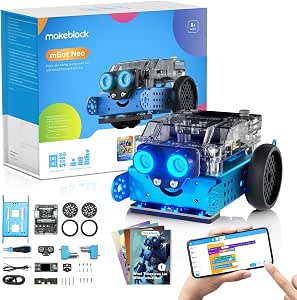 | Best for Growing Coding Skills | Brand: Makeblock | Model number: P1010132 | Recommended age: 8 years and up | VIEW LATEST PRICE | See Our Full Breakdown |
| Learning Resources Botley the Coding Robot Activity Set | 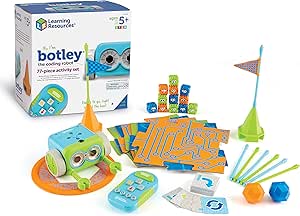 | Best for Hands-On Course Building | Brand: Learning Resources | Model: LER2935 | Recommended age: 5 years and up | VIEW LATEST PRICE | See Our Full Breakdown |
| Learning Resources Code & Go Robot Mouse Activity Set | 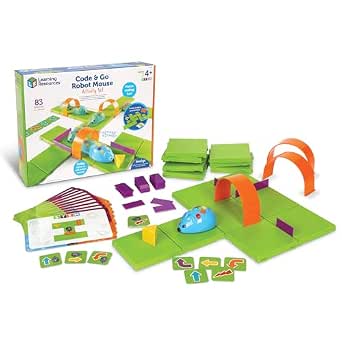 | Best for First-Time Coders | Brand: Learning Resources | Model: LER2831 | Recommended age: 4 years and up | VIEW LATEST PRICE | See Our Full Breakdown |
| VinciBot Coding Robot for Kids Ages 8–12, Scratch and Python STEM Toy |  | Best for Advancing to Python | Brand: MatataStudio | Recommended age: 8 and up | Programming languages: Scratch-style block-based coding and Python | VIEW LATEST PRICE | See Our Full Breakdown |
| Learning Resources Botley 2.0 Coding Robot |  | Best Screen-Free Upgrade | Brand: Learning Resources | Model: LER2941 | Recommended age: 5–8 years | VIEW LATEST PRICE | See Our Full Breakdown |
| Ozobot Evo Entry Coding Robot Kit for Kids |  | Best for Color-Code-to-App Learning | Brand: Ozobot | Model: Evo Entry Kit | Recommended age: 5 years and up | VIEW LATEST PRICE | See Our Full Breakdown |
| Apitor Robot J 6-in-1 STEM Coding Robot Building Kit, 480 Pieces |  | Best for Building and Rebuilding | Brand: Apitor | Model: Robot J | Recommended age: 7–12 years | VIEW LATEST PRICE | See Our Full Breakdown |
| coding robots for kid | Brand | Recommended age | Model | Included components |
|---|---|---|---|---|
| Learning Resources Botley 2.0 | Learning Resources | — | LER2938 | Coding robot, remote programmer, 40 coding cards, 6 double-sided boards, stackable obstacle pieces |
| Makeblock mBot STEM Coding Rob | Makeblock | — | 90053 | — |
| Ozobot Ozo at Home STEM Coding | Ozobot | 5 years and up | — | 1 Ozo robot and 1 charging cable |
| Thames & Kosmos My Robotic Pet | Thames & Kosmos | 8–12 years | — | — |
| Teach Tech Mech-5 STEM Coding | Teach Tech | — | — | Assembly parts and instruction manual |
| Learning Resources Botley the | Learning Resources | 5–8 years | LER2936 | Botley robot, remote programmer, detachable arms, coding cards, tiles, and obstacles |
| ELEGOO UNO R3 Smart Robot Car | ELEGOO | 12 years and up | US-EL-KIT-012 | — |
| Wonder Workshop Dash Coding Ro | Wonder Workshop | 6 years and up | — | Dash robot, two building-brick connectors, and USB charging cable |
| Makeblock mBot2 Coding Robot | Makeblock | 8 years and up | — | mBot2 robot, 4 coding project cards, USB cable, screwdriver, and line-following track map |
| Learning Resources Botley the | Learning Resources | 5 years and up | LER2935 | — |
| Learning Resources Code & Go R | Learning Resources | 4 years and up | LER2831 | — |
| VinciBot Coding Robot for Kids | MatataStudio | 8 and up | — | — |
| Learning Resources Botley 2.0 | Learning Resources | 5–8 years | LER2941 | Robot, remote programmer, coding cards, tiles, and obstacle pieces |
| Ozobot Evo Entry Coding Robot | Ozobot | 5 years and up | Evo Entry Kit | Evo robot, Get Started activities, charging cable, 5 dual-tip markers, and zip case |
| Apitor Robot J 6-in-1 STEM Cod | Apitor | 7–12 years | Robot J | — |
More Details on Our Top Picks
Learning Resources Botley 2.0 Coding Robot Activity Set
Botley 2.0 is my strongest pick for children ready to learn coding through direct, screen-free play. Kids send sequences with a remote programmer and coding cards, then watch the robot tackle routes built from the included boards and obstacles. Its object sensing and 45-degree turns make challenges more varied than simple forward-and-back commands, while lights, sounds, and music keep the feedback lively. Compared with the Ozobot Ozo at Home, Botley offers a larger physical route-building set, but Ozo has a clearer path toward Blockly programming. Botley’s tradeoff is that it depends on a separate remote rather than moving into app-based coding, so it suits early sequencing practice better than children seeking a progression into text-based programming. The 5–10 age range also gives it a shorter runway than the older-kid kits.
Pros:- Screen-free commands make sequencing accessible without a tablet or computer.
- Six double-sided boards, coding cards, and obstacles support varied route challenges.
- Object sensing and 45-degree turns add complexity beyond basic movement commands.
- Lights, sounds, and music provide immediate feedback during play.
Cons:- The remote programmer is required to control the robot.
- It does not offer the Blockly progression found in the Ozobot Ozo at Home.
- Its recommended age range may limit long-term appeal for older children.
Best for: Families seeking a screen-free first coding robot for children ages 5–10 who enjoy building routes and solving hands-on challenges.
Not ideal for: Children ready for app-based or text-based programming, or families who want a robot that can be controlled without its separate remote programmer.
- Brand:Learning Resources
- Model:LER2938
- Age range:5–10 years
- Piece count:78
- Included components:Coding robot, remote programmer, 40 coding cards, 6 double-sided boards, stackable obstacle pieces
- Coding features:Screen-free coding, multi-step commands, object sensing, 45-degree turns
- Additional features:Lights, sounds, music, 16 secret code combinations
- Warranty:No warranty
Our verdict“Choose Botley 2.0 for a well-equipped, screen-free introduction to sequencing, but pick the Ozobot Ozo at Home if app-based coding progression matters more.”
Makeblock mBot STEM Coding Robot Kit for Kids Ages 8–12
The Makeblock mBot is a better fit for children who want to understand how a robot is built, not only tell one where to go. Its roughly 15-minute assembly introduces basic construction, while Scratch, Arduino, and mBlock give families several ways to approach programming. Line-following and obstacle-avoidance functions turn code into visible robot behavior, and compatibility with a broad range of Makeblock modules leaves room for later projects. Compared with the Botley 2.0, mBot demands more setup and moves beyond screen-free play, but it offers a stronger bridge to electronics and programming platforms. That flexibility comes with practical costs: batteries are not included, and the 8-and-up audience is older than Botley’s early learner focus. I’d choose it for a child who is ready to build and tinker rather than just complete guided routes.
Pros:- Build-and-code format connects robot construction with programming concepts.
- Scratch, Arduino, and mBlock support different levels and approaches to coding.
- Line-following, obstacle avoidance, and remote control give programs practical outcomes.
- Compatibility with Makeblock modules and parts supports future expansion.
Cons:- Four AA batteries and a CR2025 remote battery are required and not included.
- Its age guidance and programming options make it less suited to younger beginners than Botley 2.0.
- The kit requires assembly and compatible apps or programming platforms for much of its coding value.
Best for: Families with children ages 8 and up who want a buildable robot that can grow from introductory Scratch projects toward Arduino and electronics.
Not ideal for: Younger beginners who want immediate screen-free play, or households that prefer a ready-to-use robot without separate batteries and assembly.
- Brand:Makeblock
- Model:90053
- Age range:8 years and up
- Programming platforms:Scratch, Arduino, mBlock
- Approximate build time:About 15 minutes
- Functions:Line-following, obstacle avoidance, remote control
- Robot power:4 AA batteries, not included
- Remote power:1 CR2025 battery, not included
- Compatibility:100+ electronic modules and 500+ Makeblock parts
Our verdict“Pick mBot for an older child who wants hands-on building and a path into multiple coding platforms, rather than a simple screen-free starter.”
Ozobot Ozo at Home STEM Coding Robot Kit for Kids Ages 5+
Ozobot Ozo at Home stands out for giving beginners a structured route from physical coding to digital programming. Children start with color-code markers, magnetic tiles, and a two-sided board, then can move on to Ozobot Blockly using a computer or tablet. Its 27 guided activities provide a more lesson-led experience than the open-ended route building in Botley 2.0, which may help families who want a sequence of activities rather than inventing every challenge themselves. The tradeoff is that Ozo’s screen-free play is only one stage: Blockly requires a device, and the supplied component list names the robot and charging cable but not the protective case mentioned in the title. Compared with the Makeblock mBot, this kit is aimed at younger starters and offers a gentler coding path, not a buildable electronics project.
Pros:- Twenty-seven guided activities give beginners a clear progression through coding concepts.
- Color codes, magnetic tiles, and a magnetic board support hands-on screen-free practice.
- Ozobot Blockly offers a next step for children ready to code on a computer or tablet.
- Activities include sequencing, logic, problem-solving, and engineering design.
Cons:- Blockly requires a computer or tablet, unlike the screen-free play offered by Botley 2.0.
- The listed included components do not mention the protective case referenced in the title.
- Its guided-activity format may feel less open-ended than building custom routes with Botley 2.0.
Best for: Parents and educators seeking guided coding activities for children ages 5 and up, with a gradual move from tactile play to Blockly.
Not ideal for: Families who want coding to remain entirely screen-free, or buyers who specifically expect a protective case among the listed included components.
- Brand:Ozobot
- Model number:70101KIT
- Recommended age:5 years and up
- Guided activities:27
- Programming methods:Color codes and Ozobot Blockly
- Included components:1 Ozo robot and 1 charging cable
- Material:Plastic
- Dimensions:9 x 7.5 x 2 inches
Our verdict“Choose Ozo at Home for a guided beginner path that can progress into Blockly, provided a computer or tablet is available for the later stage.”
Thames & Kosmos My Robotic Pet: Coding Chameleon Robotics Kit
The Coding Chameleon makes the most sense for children who want a characterful robot to build, then program with physical action cards. Its 15-inch body, color-changing RGB LEDs, sensors, and moving tongue give each command an expressive result; the Coding, Wild, and Pet modes also make it less focused on route challenges than Botley 2.0. Instead, the appeal is combining assembly, simple card-based programming, and biomimicry. The 48-page manual adds context for the build, though younger children may need adult help, unlike the more immediately accessible Ozobot Ozo at Home activities. It is not the right choice for a child seeking app-based coding or a compact robot: the build is larger and requires time, and batteries are recommended but are not listed among the included components.
Pros:- Physical action cards make programming screen-free.
- Color sensing, infrared sensing, and RGB LEDs support responsive play across three modes.
- Articulated movement and an automatically moving tongue make commands easy to see.
- The 48-page manual covers assembly, robotics, and biomimicry.
Cons:- Assembly may require adult help for children in the recommended 8–12 age range.
- Batteries are recommended but are not listed among the included components.
- Its 15-inch build is less compact and less focused on route-based coding than Botley 2.0.
Best for: Families with children ages 8–12 who enjoy assembling animal-inspired models and want screen-free programming with visible, character-like responses.
Not ideal for: Children who want a compact, ready-to-play coding robot or app-based programming, and families who prefer a build that does not need adult help.
- Brand:Thames & Kosmos
- Model number:620507
- Recommended age:8–12 years
- Length:15 inches
- Play modes:Coding, Wild, Pet
- Sensors:Color sensor and infrared sensor
- Programming method:Physical colored action cards
- Lighting:RGB LEDs
- Manual:48 pages; adult help recommended for ages 8+, independent play for ages 12+
Our verdict“Choose the Coding Chameleon for a screen-free robotics build with expressive animal behaviors, not for a compact coding companion or app-based lessons.”
Teach Tech Mech-5 STEM Coding Robot Building Kit
Teach Tech Mech-5 is the most mechanical option in this group: children assemble the robot and program actions by snapping coding buttons onto a wheel. That makes cause and effect tangible, with movements such as throwing, lifting, kicking, and drawing serving as the output of a sequence. Unlike the ready-to-program Botley 2.0, Mech-5 is a multi-hour construction project, so the reward is as much in understanding the mechanism as in directing a robot. It also runs without batteries, using water, wind, or sun, which avoids battery replacement but makes play dependent on an appropriate power source. Compared with the Makeblock mBot, it focuses on physical mechanics rather than Scratch, Arduino, or electronics expansion. I’d reserve it for older children who like careful building and can stay with a longer project.
Pros:- The mechanical coding wheel makes command sequences physically visible.
- Action-based tasks connect coding logic with mechanical engineering.
- No batteries are required; the kit uses water, wind, or sun as power sources.
- Step-by-step assembly provides a substantial hands-on building project.
Cons:- Assembly takes multiple hours and demands patience and careful attention.
- The 10-and-up age guidance makes it less suitable for younger beginners than Botley 2.0.
- It does not offer the Scratch and Arduino programming options available with Makeblock mBot.
Best for: Children ages 10 and up who enjoy multi-hour construction projects and want to explore coding logic through a physical mechanism rather than an app.
Not ideal for: Younger children seeking immediate robot play, or families looking for Scratch, Arduino, or a quick setup with predictable power from included batteries.
- Brand:Teach Tech
- Model number:TTC-895
- Age range:10 years and up
- Power source:Water, wind, or sun; no batteries required
- Assembly:Required
- Included components:Assembly parts and instruction manual
- Programmable actions:Throwing, lifting, kicking, and drawing
- Warranty:1-year manufacturer warranty
Our verdict“Pick Mech-5 for an older, patient builder who values mechanical cause and effect over app-based coding or quick, ready-to-play robot activities.”
Learning Resources Botley the Coding Robot, 45-Piece Set
Botley’s screen-free remote makes this a straightforward introduction to coding for children who are not ready to work in an app. Kids can program sequences of up to 80 steps, then add loops and if/then logic as they tackle obstacle courses and path-following challenges. The included 45-piece set gives them materials to change the task rather than just repeat a demonstration. Compared with Botley the Coding Robot Activity Set, this version is clearly aimed at ages 5–8 and lists its step capacity, but the Activity Set spells out a larger assortment of challenge pieces and coding cards. Both keep screens out of the activity. Botley’s separate remote programmer is a hands-on control method, though it means children need to manage a controller as well as the robot. I’d choose this for guided early logic practice, not for older kids seeking app-based coding or a path to Python.
Pros:- Works without a screen or app
- Introduces sequencing, loops, and if/then logic
- Programs sequences up to 80 steps
- Includes accessories for building obstacle courses and coding challenges
Cons:- Children must use a separate remote programmer
- Its age range is focused on younger beginners rather than growing into advanced coding
- No manufacturer warranty is listed
Best for: Families with children ages 5–8 who want screen-free sequencing and logic activities with included course-building accessories.
Not ideal for: Older children ready for app-based programming or text coding, and buyers who want a manufacturer warranty.
- Brand:Learning Resources
- Model:LER2936
- Recommended age:5–8 years
- Programming capacity:Up to 80 steps
- Set size:45 pieces
- Included components:Botley robot, remote programmer, detachable arms, coding cards, tiles, and obstacles
- Screen-free:Yes
- Warranty:No manufacturer warranty
Our verdict“Choose this Botley for screen-free, hands-on coding practice for ages 5–8; choose the ELEGOO or mBot2 instead for app-supported programming and more advanced projects.”
ELEGOO UNO R3 Smart Robot Car Kit V4 with Camera
ELEGOO’s camera-equipped car is the most electronics-and-assembly-focused pick here: kids build a robot around an UNO R3 controller, then program it with Arduino IDE. Its camera and Wi-Fi module add FPV video to features such as line tracking and obstacle avoidance, giving older learners a project that reaches beyond the app-led activities of Wonder Workshop Dash. The tradeoff is the learning curve. This kit requires assembly and programming, and adult guidance is recommended for first-time builders; Dash arrives ready to use and is better for children who want to start coding activities right away. ELEGOO’s illustrated tutorial and keyed connectors help make the build more approachable, while the included rechargeable battery avoids a separate battery purchase. I’d pick it for a patient teen interested in robotics hardware, not as a simple first coding toy for a young child.
Pros:- Combines an UNO R3 controller with Arduino IDE programming
- Camera and Wi-Fi module support FPV video
- Supports line tracking, obstacle avoidance, and auto follow
- Includes an illustrated tutorial, keyed connectors, and a rechargeable battery
Cons:- Assembly and programming make it more demanding than ready-to-use Dash
- Adult guidance is recommended for first-time builders
- Recommended for ages 12 and up, so it is not a fit for younger coding beginners
Best for: Teens ages 12 and up who want to assemble a robot car and learn Arduino-based programming with camera and sensor features.
Not ideal for: Younger children or families seeking a ready-to-use robot with simple app activities and little adult setup.
- Brand:ELEGOO
- Model:US-EL-KIT-012
- Controller:UNO R3
- Camera and Wi-Fi module:ESP32-WROVER-based
- Battery:2000 mAh rechargeable lithium-ion
- Control methods:App and IR remote
- Programming platform:Arduino IDE
- Recommended age:12 years and up
- Dimensions:8 x 7 x 6 inches
Our verdict“Pick ELEGOO for a teen who wants to build and program a sensor-rich robot car, rather than a younger child who needs immediate, guided play.”
Wonder Workshop Dash Coding Robot for Kids Ages 6+
Dash is ready to use without assembly, making it a strong fit for children who want a responsive robot rather than a build project. Across five compatible apps, activities introduce sequencing, loops, algorithms, and variables; singing, dancing, voice response, and obstacle navigation give those coding tasks an immediate, playful result. Unlike the screen-free Botley 45-Piece Set, Dash depends on a compatible phone or tablet, but the apps offer a broader digital activity path. Compared with the Makeblock mBot2, Dash is less focused on building toward Python or expandable hardware and more suited to guided early learning. The included building-brick connectors give children a way to customize it, though the robot is designed for indoor use and has no camera. Its listed battery life of up to five hours supports extended play sessions, but it still needs charging between them.
Pros:- No assembly required before play
- Five apps introduce several coding concepts through activities
- Works with Apple iOS, Android, and Fire OS apps
- Rechargeable battery supports up to five hours of active play
Cons:- Requires a compatible phone or tablet for app-based coding
- Designed for indoor use
- Does not include a camera
Best for: Families with children ages 6 and up who have a compatible device and want app-guided coding activities without assembling a robot.
Not ideal for: Buyers who want screen-free coding, outdoor use, or a build-and-program kit that can progress toward Python.
- Brand:Wonder Workshop
- Recommended age:6 years and up
- Coding apps:Five apps for Apple iOS, Android OS, and Fire OS
- Functions:Singing, dancing, obstacle navigation, and voice-command response
- Battery:Rechargeable lithium-ion, included
- Battery life:Up to 5 hours of active play
- Included components:Dash robot, two building-brick connectors, and USB charging cable
- Camera:No camera
- Warranty:1 year against manufacturer defects
Our verdict“Choose Dash for a child who wants immediate, app-guided coding play; choose Botley for screen-free learning or mBot2 for a more advanced coding path.”
Makeblock mBot2 Coding Robot – Scratch & Python Programming Kit for Kids (Ages 8–14)
mBot2 offers a clear next step for children who are ready to move from block coding toward text-based programming. It supports Scratch and Python, while more than 10 sensors and Bluetooth, USB, and Wi-Fi connectivity give projects room to grow beyond basic driving commands. Compared with Dash, which emphasizes app-led activities and immediate play, mBot2 is better suited to building and experimenting over time; compared with the ELEGOO UNO R3 car, it targets younger learners and provides step-by-step assembly instructions. That breadth comes with a learning curve: the feature set may overwhelm younger beginners, and programming requires a smartphone or tablet. The listed battery life is up to five hours per charge, so long project sessions need charging breaks. For a curious child aged 8 or older, its support for 30-plus additional modules makes this the lineup’s strongest choice for extending coding projects.
Pros:- Supports both Scratch block coding and Python
- Includes more than 10 sensors for varied projects
- Connects through Bluetooth, USB, and Wi-Fi
- Expandable with more than 30 additional modules
Cons:- Its many features may overwhelm younger beginners
- Requires a smartphone or tablet to run the programming app
- Battery life is limited to up to five hours per charge
Best for: Children ages 8 and up who already enjoy coding activities and want to progress from Scratch blocks toward Python and sensor-based projects.
Not ideal for: Very young first-timers, families without a smartphone or tablet for the programming app, or buyers seeking a screen-free robot.
- Brand:Makeblock
- Model number:P1010132
- Recommended age:8 years and up
- Programming:Scratch and Python
- Sensors:10+ advanced sensors
- Connectivity:Bluetooth, USB, and Wi-Fi
- Battery life:Up to 5 hours per charge
- Expandable modules:Supports 30+ additional modules
- Included components:mBot2 robot, 4 coding project cards, USB cable, screwdriver, and line-following track map
Our verdict“Choose mBot2 for an age-8-plus learner who wants a route from Scratch into Python and expandable sensor projects, rather than a simpler starter like Dash.”
Learning Resources Botley the Coding Robot Activity Set
This Botley Activity Set puts the course materials front and center: children use coding cards, double-sided tiles, and obstacle pieces to create mazes and challenges, then guide the robot with a screen-free remote programmer. Object detection, path following, and looping commands make those setups useful for practicing logic rather than just steering a toy. Compared with the 45-Piece Botley Set, this version lists 40 coding cards and 27 obstacle-building pieces, giving buyers more detail about the included challenge materials, though the two sets share the same screen-free approach. It is a more hands-on alternative to Dash, but lacks Dash’s app-based activities and rechargeable battery. The tradeoff is practical: Botley needs three AAA batteries and the remote needs two more, none included, and no warranty is listed. I’d choose it for families who value ready-made physical challenges over app features.
Pros:- Screen-free remote programming needs no phone or tablet
- Includes coding cards, double-sided tiles, obstacle pieces, and a challenge guide
- Can detect and avoid objects, follow black-line paths, and run loops
- Simple arrow-button remote suits hands-on beginner activities
Cons:- Requires five AAA batteries, which are not included
- No warranty is listed
- Does not provide the app-based progression offered by Dash or mBot2
Best for: Families with children age 5 and up who want screen-free coding practice built around physical mazes, tiles, and obstacle courses.
Not ideal for: Buyers who prefer a rechargeable robot, app-based lessons, or a listed manufacturer warranty.
- Brand:Learning Resources
- Model:LER2935
- Recommended age:5 years and up
- Set contents:Botley robot, remote programmer, detachable arms, 40 coding cards, 6 double-sided tiles, 27 obstacle-building pieces, and starter guide
- Coding method:Screen-free remote programmer
- Robot features:Object detection and avoidance, looping commands, obstacle-course navigation, and black-line path following
- Battery requirements:3 AAA batteries for Botley and 2 AAA batteries for the remote programmer; not included
- Educational skills:Coding, programming, critical thinking, logical thinking, and problem-solving
- Warranty:No warranty
Our verdict“Choose this Activity Set for screen-free maze and obstacle-course challenges, but pick Dash if you want rechargeable, app-guided coding activities.”
Learning Resources Code & Go Robot Mouse Activity Set
For a young child’s first encounter with coding, Colby the mouse makes the idea concrete: children arrange commands, then see whether the robot reaches the cheese. Its screen-free maze play keeps the focus on sequencing and cause and effect, without requiring an app or a compatible device. Compared with Botley 2.0, this set centers on one clear maze-navigation challenge rather than obstacle detection and multiple coding modes, which can make it easier to grasp at the start. The 83 pieces and double-sided cards offer ways to vary the route as skills grow, though the 20-inch grid also needs a suitable play surface. It is a simpler introduction than programmable robots such as VinciBot, but it does not progress to text coding or app-based projects. Colby needs three AAA batteries, sold separately.
Pros:- Screen-free commands make early sequencing visible and hands-on.
- Maze grids, walls, tunnels, and cards support repeatable route-building activities.
- Lights, sounds, and two speeds give children immediate feedback.
- Designed for children as young as 4.
Cons:- Requires three AAA batteries, which are not included.
- The 20-by-20-inch maze board needs a sizable play surface.
- Its maze-based activities offer less progression toward advanced coding than VinciBot.
Best for: Families introducing children ages 4 and up to sequencing who want hands-on activities that work without a screen.
Not ideal for: Buyers seeking Python, app-based projects, or advanced sensors, or families who need a compact activity that requires little floor or table space.
- Brand:Learning Resources
- Model:LER2831
- Recommended age:4 years and up
- Pieces:83
- Maze board size:20 x 20 inches
- Robot features:Lights, sounds, and two speeds
- Battery requirement:3 AAA batteries; not included
Our verdict“Choose this set for a young beginner who will benefit from simple, screen-free maze challenges rather than app-based or advanced programming.”
VinciBot Coding Robot for Kids Ages 8–12, Scratch and Python STEM Toy
VinciBot is the strongest fit here for children ready to move beyond introductory commands: it pairs Scratch-style blocks and Python with eight sensors and projects involving movement, music, lights, and drawing. That gives a learner more room to develop than the maze-and-card activities in Code & Go Robot Mouse, while still offering preset modes for getting started. Its compatibility with LEGO bricks, TECHNIC motors, and third-party electronic modules also invites children to extend projects instead of treating the robot as a closed activity. The tradeoff is a steeper learning curve: younger beginners may need help with the software and online tutorials, and several capabilities depend on compatible software. The included booklet has 17 coding cases, with more tutorials online. Compared with Ozobot Evo, VinciBot reaches Python and hardware expansion, but it is a more involved choice for families seeking quick, screen-free play.
Pros:- Supports progression from block-based coding to Python.
- Eight sensors and multiple modes offer varied project possibilities.
- Works with LEGO bricks, TECHNIC motors, and third-party electronic modules.
- Runs for over four hours per charge.
Cons:- The breadth of features can overwhelm younger or first-time coders.
- Some programming activities rely on compatible software or online tutorials.
Best for: Families with children around 8 and up who want a robot that can grow from block-based coding into Python and expandable electronics projects.
Not ideal for: Young beginners or families prioritizing fully screen-free activities, since programming and some learning materials depend on compatible software or online tutorials.
- Brand:MatataStudio
- Recommended age:8 and up
- Programming languages:Scratch-style block-based coding and Python
- Sensors:8
- Battery capacity:1500 mAh
- Runtime:Over 4 hours per charge
- Included learning materials:Challenge booklet with 17 coding cases
- Compatibility:LEGO bricks, TECHNIC motors, and third-party electronic modules
Our verdict“Pick VinciBot for an older child ready to grow from block coding into Python and expandable robotics projects.”
Learning Resources Botley 2.0 Coding Robot
Botley 2.0 adds variety to screen-free coding with obstacle detection, black-line following, and several coding modes. The remote programmer, cards, tiles, and obstacles turn commands into hands-on challenges, making it a broader activity set than Code & Go Robot Mouse, which focuses mainly on guiding a mouse through a maze. Botley is better suited to children who have outgrown a single path-finding exercise and want to build different courses, but its learning remains centered on physical commands rather than the Python progression offered by VinciBot. The 46-piece set is smaller than the mouse set’s 83 pieces, though its obstacles and multiple modes still support varied play. One practical drawback is power setup: the robot and remote together need five AAA batteries, none included, and a Phillips screwdriver is required to install them.
Pros:- Screen-free programming encourages hands-on experimentation.
- Obstacle detection and black-line following add different kinds of challenges.
- Multiple coding modes include loops and hidden actions.
- Tiles and obstacle pieces let children customize courses.
Cons:- Requires five AAA batteries, which are not included.
- Battery installation requires a Phillips screwdriver.
- Does not offer a path to Python like VinciBot.
Best for: Families with children ages 5–8 who want screen-free coding challenges that go beyond a basic maze.
Not ideal for: Buyers who want app-based or text-based programming, or who prefer a robot with fewer separate batteries and simpler setup.
- Brand:Learning Resources
- Model:LER2941
- Recommended age:5–8 years
- Set pieces:46
- Power requirement:5 AAA batteries total; not included
- Features:Obstacle detection, black-line following, multiple coding modes, and light-up effects
- Included components:Robot, remote programmer, coding cards, tiles, and obstacle pieces
Our verdict“Choose Botley 2.0 for a child who wants varied screen-free coding courses and is ready for more than basic maze navigation.”
Ozobot Evo Entry Coding Robot Kit for Kids
Ozobot Evo Entry gives children two ways to program one small robot: draw screen-free Color Codes with the included markers, or move into Ozobot Blockly’s five skill levels. That makes it a useful bridge between the physical coding of Botley 2.0 and app-dependent options such as VinciBot, without requiring a child to begin with text-based code. Access to more than 700 free educational lessons adds material for continuing practice, while the zip case helps keep the robot and markers together. Its main compromise is device reliance once a learner moves beyond Color Codes: Blockly needs a compatible device. This kit also provides less room for mechanical construction or sensor expansion than VinciBot or the building-focused Apitor Robot J. The product details specify ages 5 and up, while the title gives a narrower age range, so buyers should check fit for their child.
Pros:- Combines screen-free Color Codes with online Blockly.
- Five Blockly skill levels support progression through coding challenges.
- Includes five dual-tip markers and a zip case.
- Provides access to more than 700 free educational lessons.
Cons:- Blockly requires access to a compatible device.
- Offers less mechanical building and expansion than Apitor Robot J or VinciBot.
- The title and product details give different age-range descriptions.
Best for: Families with children ages 5 and up who want to start with drawn color commands and later try structured online coding lessons.
Not ideal for: Households without access to a compatible device for Blockly, or children who want to build and modify a robot from parts.
- Brand:Ozobot
- Model:Evo Entry Kit
- Recommended age:5 years and up
- Coding methods:Ozobot Blockly and screen-free Color Codes
- Blockly skill levels:5
- Included components:Evo robot, Get Started activities, charging cable, 5 dual-tip markers, and zip case
- Battery:Lithium-ion
- Dimensions:8.5 x 6.5 x 1.8
Our verdict“Choose Ozobot Evo if a child will benefit from starting with drawn commands and progressing to device-based Blockly lessons.”
Apitor Robot J 6-in-1 STEM Coding Robot Building Kit, 480 Pieces
Apitor Robot J puts construction at the center of coding: children use 480 snap-together pieces to assemble six robot models, then control movement through a Bluetooth app and try icon-based coding activities. That makes it a more hands-on building choice than Ozobot Evo, which focuses on color commands and Blockly rather than assembling different machines. Four control modes—including gyro and path—give children different ways to make the builds move, with two motors supporting turns and 360-degree stunts. The tradeoff is that this is not a ready-to-go screen-free robot: building takes time, app control needs a compatible Bluetooth device, and the kit needs three AA batteries that are not included. Compared with VinciBot, Apitor offers more model-building play, while VinciBot provides a clearer progression to Python and broader sensor-based projects.
Pros:- 480 pieces can be assembled into six different robot models.
- Combines hands-on building with icon-based coding activities.
- Four app control modes include dual-motor, single-motor, gyro, and path control.
- Sorting tray and building instructions support part organization and assembly.
Cons:- App control requires a compatible Bluetooth device.
- Requires three AA batteries, which are not included.
- Building and rebuilding takes more time than starting with a ready-made robot such as Botley 2.0.
Best for: Children ages 7–12 who enjoy assembling models and want to pair construction with app-based movement and icon coding.
Not ideal for: Families seeking a screen-free robot ready for immediate play, or children who would rather program than follow building instructions.
- Brand:Apitor
- Model:Robot J
- Recommended age:7–12 years
- Number of pieces:480
- Buildable models:6
- Control:Bluetooth app control
- App control modes:Dual-motor, single-motor, gyro, and path
- Batteries:3 AA batteries required; not included
Our verdict“Pick Apitor Robot J for a child who values building and rebuilding robot models as much as coding their movement.”
How We Picked
I compared the 15 robots by how clearly they teach coding concepts, how much setup and adult support they are likely to need, and whether a child can progress beyond the first activities. I also weighed build complexity, coding formats, project variety, and the practical fit for different ages and interests. A robot that is easy to start with may be a better first purchase than a more capable kit if a child would be discouraged by assembly or app setup.
The ranking favors options that balance accessible play with meaningful learning progression, then gives specialized picks their place where they serve a distinct need. That is why mBot2 leads for its Scratch-to-Python range, while Botley 2.0 ranks strongly for screen-free entry and construction kits suit children who want to make the robot as well as program it. Duplicate Botley models and closely related kits are judged by their specific included activities and formats, not treated as interchangeable by name alone. I also considered tradeoffs such as dependence on a compatible device, small components, and the difference between guided activities and open-ended programming.
Factors to Consider When Choosing Coding Robots For Kids
Before choosing a coding robot, decide what kind of learning experience your child is likely to stick with. A robot can teach valuable ideas through movement, building, or visual code, but the most elaborate option is not automatically the best fit. These factors can help you judge the tradeoffs beyond the product names and feature lists.
Choose a First Coding Format They Can Manage
Young beginners often benefit from seeing a short sequence produce an immediate result, whether they use buttons, cards, color marks, or simple visual blocks. That quick feedback helps connect instructions with cause and effect. A screen-free robot can reduce distractions, but it may not offer the same depth as an app-based coding environment. For an older child, the question may be whether a visual interface can eventually lead to more advanced ideas. Avoid buying based only on the number of coding modes: a child who finds the first interface confusing may never reach the advanced one.
Balance Coding Time Against Building Time
Some kits arrive ready to program, while others make assembly a major part of the activity. Building can teach mechanical reasoning and give children a sense of ownership, but it also adds steps before the first coding success. Check whether your child enjoys following diagrams and handling small parts, rather than assuming that a STEM label means the kit will suit every learner. For a child mainly curious about giving commands to a robot, a ready-to-use model may hold attention better. If construction is part of the appeal, look for a kit whose projects leave room to modify the design after assembly.
Look for a Real Next Step, Not Just More Activities
A large activity count can keep a robot busy for a while, yet progression matters more for a child who wants to keep learning. Look for a move from sequencing to loops, conditionals, sensor responses, or text-based code, depending on age and readiness. Not every child needs a route to Python; a younger learner may get more from repeated practice with basic instructions. The common mistake is paying for advanced capabilities that are unlikely to be used soon. Match the learning ceiling to the child’s current skill and likely interest over the next few years.
Factor in Devices, Apps, and Setup Help
App-connected robots can provide visual coding tools and expanded activities, but they also depend on device access, software compatibility, and a comfortable setup process. Before choosing one, check which device types are supported and whether your household can offer a device during play. A no-screen option avoids that dependency, though it may have fewer ways to customize projects. Think about whether an adult will be available to install software, pair devices, or help troubleshoot. Buying a robot that fits your household’s technology routine can matter as much as its coding features.
Match the Robot to the Child’s Kind of Curiosity
Children who like storytelling and playful interaction may respond to a character-style robot, while builders may prefer a chassis, mechanical parts, or a robot they can assemble in different forms. A camera-equipped car kit or a sensor-rich model may appeal to a child interested in how machines respond to their surroundings. Do not assume that the most technical-looking option will be the most engaging: a clear project goal often matters more than a long feature list. Ask whether the child wants to command, customize, build, or experiment. That preference can narrow the field faster than comparing every specification.
Plan for Parts, Space, and Reuse
Construction kits and multi-part activity sets need a place to build and a way to keep pieces together between sessions. Small components can be easy to lose, and an incomplete kit may interrupt a project long after the initial setup. Consider storage, workspace, and whether the robot can be used in more than one configuration. A compact ready-to-run model may be easier to bring out for short play sessions, while a larger kit can reward children who enjoy longer projects. Reusability is not just about the number of builds; it is about whether the child has reasons to return to the robot.
Frequently Asked Questions
Which coding robot is a sensible first choice for a child who has never coded?
Start with the format the child is most likely to understand and enjoy, rather than choosing the robot with the most advanced features. Botley 2.0 is a strong screen-free starting point, while Code & Go Robot Mouse offers a simple path into planning movement. If the child is comfortable using a tablet and wants a wider coding path, an app-based model may fit better. Adult support can still help with reading instructions and setting up activities. The best first robot is one that makes it easy to try, make a mistake, and try again.
Should I choose a screen-free robot or one that uses an app?
Choose screen-free play if limiting device time or keeping setup simple is a priority. Those robots can make sequencing tangible, but they may offer fewer ways to create and revise complex programs. App-based models can add visual coding tools and, on some options, a progression toward more advanced languages. They also require a compatible device and may need help with installation or pairing. Your household’s device access and the child’s preferred learning style should guide this choice.
Is a robot-building kit better for learning coding?
Not automatically: building and coding teach related but different skills. A construction kit adds mechanical reasoning and can make the robot feel like the child’s own project, but assembly may delay the first programming activity. A ready-to-use robot lets a beginner focus on commands and outcomes sooner. Choose a build-first kit when the child enjoys instructions, parts, and tinkering, not just because it appears more technical. Some children will benefit from a simpler coding experience before taking on both assembly and programming.
How can I tell whether a robot will remain useful as my child gets older?
Look for a clear next step in the learning experience, such as moving from basic sequences to visual blocks, sensor-driven programs, or text-based coding. The mBot2 and VinciBot stand out for offering Scratch and Python routes, while several simpler options are better suited to early coding practice. Advanced modes only add value if the child is interested in using them and can access the required device or software. Also check whether the robot supports new projects beyond the included activities. A strong fit is one that matches current ability while leaving a realistic path forward.
What should I check before buying a programmable robot car kit?
Confirm the expected assembly effort, the child’s comfort with electronics or small components, and whether the kit requires extra tools or equipment. Check how programming is done and whether a computer, phone, or tablet is needed. A car kit can be rewarding for a child interested in vehicles and mechanical systems, but it may be less suitable for someone who wants immediate, character-like interaction. Consider available workspace and how the parts will be stored between sessions. If the child’s main goal is learning code rather than building hardware, a ready-to-run robot may be a smoother fit.
Conclusion
For the strongest balance of coding progression and project potential, I recommend Makeblock mBot2 as the best overall. Botley 2.0 is my best beginner pick for screen-free, approachable activities, while Botley the Coding Robot 45-Piece Set is the best value-style choice for families seeking a straightforward starter set with included activity materials. For a premium learning path, mBot2 also makes the most sense for children ready to grow from Scratch toward Python. Choose ELEGOO UNO R3 Smart Robot Car Kit for a child drawn to building and robotics hardware, or Ozobot Evo when color-code play and app activities are the bigger draw. If assembly is the main attraction, compare Apitor Robot J and Mech-5; if it is not, favor a ready-to-use model. Match the robot to the child’s preferred way to learn, and the best fit becomes much clearer.