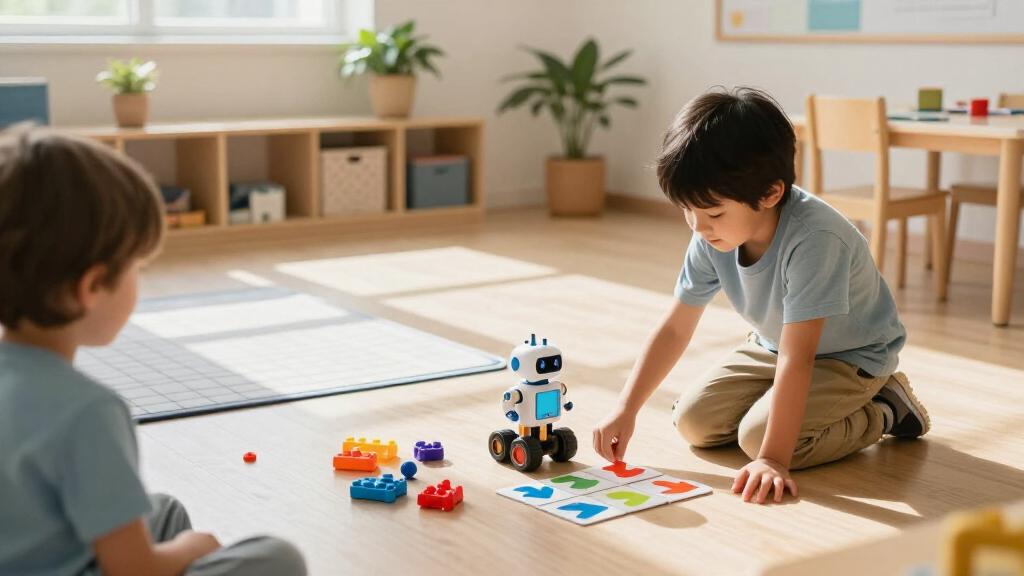

Children’s educational coding robots range from screen-free toys for first commands to buildable kits that introduce text-based programming. My best overall pick is the Wonder Workshop Dash for its approachable entry point and room to explore coding concepts; the Botley 2.0 stands out for screen-free play, while the Makeblock mBot suits children ready to build and code. The main tradeoff is between simple, immediate activities and kits that demand more setup but offer deeper projects. Age, adult setup time, and whether a child prefers building or hands-on play all shape the right choice. Read on for my full comparison and recommendations by learner type.

Prime made for students and young adults
- Fast, free delivery for dorm and study essentials
- Prime Video and Amazon Music included
- Member-only deals
Key Takeaways
- Dash earns my best overall spot because it balances an accessible start with coding activities that can grow beyond basic commands.
- Botley 2.0 is the clearest screen-free direction, while the Code & Go Mouse sets lean on physical path planning and are less suited to open-ended coding.
- The Makeblock mBot and mBot Ranger shift the experience toward building and programming, making them better fits for older children who enjoy assembly.
- The lineup splits between ready-to-play robots and kits: the Teach Tech Mech-5 and Elegoo Uno R3 ask more of a child and supervising adult than the activity-focused picks.
- Several entries are close variants or overlapping kits, including Botley 2.0, Botley, and Code & Go Mouse options; compare included activities and components before choosing.
| Teach Tech Mech-5 STEM Coding Robot Building Kit for Kids Ages 10+ |  | Best for Mechanical Building | Brand: Teach Tech | Model: TTC-895 | Age range: 10 years and up | VIEW LATEST PRICE | See Our Full Breakdown |
| WhalesBot C3 Pro 12-in-1 Coding Robot Kit for Kids | 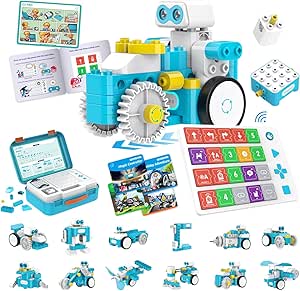 | Best for Guided Early Learning | Brand: WhalesBot | Model: C3 Pro | Recommended age: 4 years and up | VIEW LATEST PRICE | See Our Full Breakdown |
| Learning Resources Code & Go Robot Mouse Activity Set | 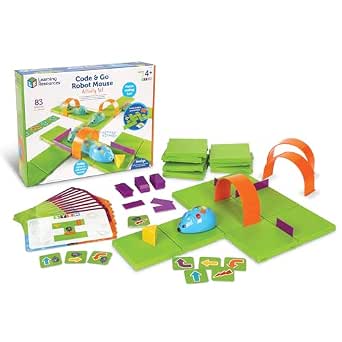 | Best for Screen-Free Sequencing | Brand: Learning Resources | Model number: LER2831 | Recommended age: 4 years and up | VIEW LATEST PRICE | See Our Full Breakdown |
| Makeblock mBot Arduino Robot Kit with Scratch Coding Box for Kids Ages 8–12 |  | Best for Coding Progression | Recommended age: 8–12 years | Projects: 4 | Assembly time: About 15 minutes | VIEW LATEST PRICE | See Our Full Breakdown |
| Learning Resources Botley 2.0 Coding Robot |  | Best for Screen-Free Robot Challenges | Brand: Learning Resources | Model: LER2941 | Recommended age: 5–8 years | VIEW LATEST PRICE | See Our Full Breakdown |
| Thames & Kosmos My Robotic Pet: Coding Chameleon |  | Best for Screen-Free Robotic Pets | Brand: Thames & Kosmos | Model number: 620507 | Length: 15 inches | VIEW LATEST PRICE | See Our Full Breakdown |
| Wonder Workshop Dash Coding Robot for Kids Ages 6+ |  | Best for App-Guided Beginners | Brand: Wonder Workshop | Recommended age: 6 years and up | Included components: Dash robot, two building brick connectors, and USB charging cable | VIEW LATEST PRICE | See Our Full Breakdown |
| Ozobot Evo Entry Coding Robot Kit |  | Best for Gradual Skill Progression | Brand: Ozobot | Age range: 5 years and up | Educational objective: Coding skills and STEM | VIEW LATEST PRICE | See Our Full Breakdown |
| Educational Insights PYXEL Coding Robot |  | Best for Moving from Blockly to Python | Brand: Educational Insights | Model: 1130 | Age range: 8–14 years | VIEW LATEST PRICE | See Our Full Breakdown |
| Learning Resources Botley 2.0 Coding Robot Activity Set |  | Best Screen-Free Route-Building Set | Brand: Learning Resources | Model: LER2938 | Pieces: 78 | VIEW LATEST PRICE | See Our Full Breakdown |
| Makeblock mBot Ranger 3-in-1 Coding Robot Building Kit for Kids |  | Best for Multi-Form Builds | Brand: Makeblock | Model: MBR-K01-01 | Recommended age: 10 years and up | VIEW LATEST PRICE | See Our Full Breakdown |
| Learning Resources Botley the Coding Robot |  | Best for Screen-Free Beginners | Brand: Learning Resources | Model: LER2936 | Recommended age: 5–8 years | VIEW LATEST PRICE | See Our Full Breakdown |
| Elegoo Uno R3 Smart Robot Car Kit V4 with Camera – Compatible with Arduino |  | Best for Camera-Based Robotics Projects | Brand: ELEGOO | Set name: ELEGOO UNO R3 Smart Robot Car Kit V4 | Model number: US-EL-KIT-012 | VIEW LATEST PRICE | See Our Full Breakdown |
| Makeblock mBot STEM Coding Robot Kit for Kids Ages 8–12 |  | Best First Buildable Coding Robot | Brand: Makeblock | Model: 90053 | Recommended age: 8 years and up | VIEW LATEST PRICE | See Our Full Breakdown |
| Learning Resources Code & Go Robot Mouse |  | Best for Preschool Coding Basics | Brand: Learning Resources | Model number: LER2841 | Age range: 4–7 years | VIEW LATEST PRICE | See Our Full Breakdown |
| children’s educational coding robot | Brand | Recommended age | Included components | Model |
|---|---|---|---|---|
| Teach Tech Mech-5 STEM Coding | Teach Tech | — | Assembly parts and English instruction manual | TTC-895 |
| WhalesBot C3 Pro 12-in-1 Codin | WhalesBot | 4 years and up | — | C3 Pro |
| Learning Resources Code & Go R | Learning Resources | 4 years and up | — | — |
| Makeblock mBot Arduino Robot K | — | 8–12 years | — | — |
| Learning Resources Botley 2.0 | Learning Resources | 5–8 years | Robot, remote, coding cards, tiles, and obstacle pieces | LER2941 |
| Thames & Kosmos My Robotic Pet | Thames & Kosmos | 8–12 years | Plastic building parts and manual | — |
| Wonder Workshop Dash Coding Ro | Wonder Workshop | 6 years and up | Dash robot, two building brick connectors, and USB charging cable | — |
| Ozobot Evo Entry Coding Robot | Ozobot | — | Evo robot, Get Started activities, charging cable, five dual-tip Color Code Markers, and zip case | — |
| Educational Insights PYXEL Cod | Educational Insights | — | — | 1130 |
| Learning Resources Botley 2.0 | Learning Resources | — | Coding robot, remote programmer, 40 coding cards, six double-sided boards, and obstacle pieces | LER2938 |
| Makeblock mBot Ranger 3-in-1 C | Makeblock | 10 years and up | — | MBR-K01-01 |
| Learning Resources Botley the | Learning Resources | 5–8 years | Botley, remote programmer, detachable arms, coding cards, tiles, and obstacles | LER2936 |
| Elegoo Uno R3 Smart Robot Car | ELEGOO | 12 years and up | — | — |
| Makeblock mBot STEM Coding Rob | Makeblock | 8 years and up | Robot kit | 90053 |
| Learning Resources Code & Go R | Learning Resources | — | Robot mouse, 30 double-sided coding cards, activity guide | — |
More Details on Our Top Picks
Teach Tech Mech-5 STEM Coding Robot Building Kit for Kids Ages 10+
The Mech-5 suits older children who want to understand how a robot is built as well as how it follows programmed instructions. Its multi-hour assembly makes the mechanics part of the learning: once built, children use a mechanical coding wheel with snap-on buttons to set actions such as lifting, throwing, kicking, and drawing. Compared with the Makeblock mBot Arduino Robot Kit, Mech-5 puts more emphasis on hands-on mechanical construction and uses a physical programming method rather than Scratch and Arduino. That makes it a tactile option for kids who enjoy building, though it offers less of a direct path into software-based coding. The long build can be rewarding for patient makers, but may frustrate children who want a robot ready for play quickly.
Pros:- Combines robot assembly with introductory coding and mechanical engineering
- Physical coding wheel makes programmed instructions tangible
- Offers several distinct actions, including lifting, drawing, and rotating
- Step-by-step instructions support a multi-stage building activity
Cons:- Assembly takes multiple hours before the robot is ready for programmed play
- Mechanical coding does not provide the software progression found in the Makeblock mBot Arduino Robot Kit
Best for: Patient makers aged 10 and up who want to build a robot and explore physical, mechanical coding.
Not ideal for: Children who want a quick-start activity or families looking for app-based or block-based programming.
- Brand:Teach Tech
- Model:TTC-895
- Age range:10 years and up
- Programming method:Mechanical coding wheel with snap-on buttons
- Actions:Throwing, lifting, kicking, drawing, moving, and 360-degree rotation
- Assembly:Hands-on kit with step-by-step instructions; multiple hours of build time
- Included components:Assembly parts and English instruction manual
- Warranty:1 year against manufacturer defects
Our verdict“Choose Mech-5 for an older child who enjoys a substantial build and hands-on mechanical coding.”
WhalesBot C3 Pro 12-in-1 Coding Robot Kit for Kids
The WhalesBot C3 Pro is geared toward young children who benefit from stories and concrete prompts while learning what a sequence of commands does. It includes 12 guided models, coding cards, storybooks, and a coding panel, so an adult can move from a shared activity to more independent experiments. Compared with the Code & Go Robot Mouse Activity Set, it offers more model variety and Bluetooth connectivity, while the Mouse set centers on arranging maze pieces and planning a route. The WhalesBot’s remote controller, lights, and sounds add interactive play, but its many parts and activities may take adult help to organize and introduce. Its age guidance starts at four, making it a better fit for early learners than older children seeking a deeper coding progression.
Pros:- Twelve guided builds give young learners varied starting points
- Coding cards, storybooks, and a panel support hands-on sequencing
- Includes both guided activities and open-ended building potential
- Storage box helps keep the structural and coding pieces together
Cons:- Its age focus may feel limiting for children ready for more advanced coding
- The many components and activity materials can require adult setup and organization
Best for: Families with children aged four and up who want story-led, guided robot activities and room to build different models.
Not ideal for: Older children ready for more advanced programming, or families who prefer a compact activity with fewer pieces to manage.
- Brand:WhalesBot
- Model:C3 Pro
- Recommended age:4 years and up
- Guided models:12
- Structural parts:52
- Coding cards:38
- Other activity materials:4 storybooks, 1 activity map, and 1 coding panel
- Connectivity and controls:Bluetooth; remote controller and coding panel
- Electronic components:4
Our verdict“Pick the C3 Pro for a young learner who will benefit from varied, story-supported builds and coding activities.”
Learning Resources Code & Go Robot Mouse Activity Set
The Code & Go Robot Mouse Activity Set makes the sequence-and-result relationship easy to see: children lay out a maze, plan commands with cards, and use button controls to guide Colby toward the cheese. Its 16 maze grids and walls let kids change the route, giving repeated practice in logic and troubleshooting without a screen. Compared with the WhalesBot C3 Pro, the Mouse set is more focused on route planning and less focused on building multiple robot models or story activities. That narrower scope can help a beginner concentrate on sequencing, but children looking for a robot that builds or performs a wider range of projects may outgrow it sooner. The included cards and activity guide provide structure; families will need to supply three AAA batteries.
Pros:- Screen-free controls make command sequencing concrete
- Maze grids, walls, and tunnels support changing routes and repeat play
- Coding and activity cards offer guided challenges
- Two speeds, lights, and sounds add feedback as the mouse moves
Cons:- Requires three AAA batteries, which are not included
- Its focus on maze navigation offers less building variety than the WhalesBot C3 Pro
Best for: Families introducing children aged four and up to coding through physical routes, command cards, and screen-free play.
Not ideal for: Children who want to assemble robot models or progress into computer-based coding, and households that prefer not to supply batteries.
- Brand:Learning Resources
- Model number:LER2831
- Recommended age:4 years and up
- Maze board size:20 × 20 inches
- Maze components:16 maze grids, 22 maze walls, and 3 tunnels
- Cards:30 double-sided coding cards and 10 double-sided activity cards
- Included items:Robot mouse, cheese wedge, and activity guide
- Power:3 AAA batteries, not included
- Robot features:Lights, sounds, and two speeds
Our verdict“Choose the Robot Mouse for a young beginner who learns best by planning and changing physical routes.”
Makeblock mBot Arduino Robot Kit with Scratch Coding Box for Kids Ages 8–12
The Makeblock mBot Arduino Robot Kit is a strong choice for children who want a path from a first robot build toward more technical coding. It pairs illustrated assembly instructions with four guided projects, then introduces Scratch and Arduino so learners can progress from block-based programming to a text-based platform. Compared with the Teach Tech Mech-5, it trades Mech-5’s long, mechanically focused build for a roughly 15-minute assembly and a more direct software-coding route. The short setup can get children to project work sooner, though some may need adult help with assembly or coding. Its four projects cover line following, obstacle avoidance, and remote control, but the provided product details do not state the power requirements, so families should check what is needed before starting.
Pros:- Introduces both Scratch and Arduino for a broader coding progression
- Four guided projects give learners concrete goals
- Illustrated instructions support assembly and troubleshooting
- About 15 minutes of assembly gets children to coding activities quickly
Cons:- Some children may need adult support with assembly and coding activities
- The product details do not specify batteries or other power requirements
Best for: Children aged 8–12 who want guided robot projects and a gradual move from block coding toward Arduino.
Not ideal for: Families seeking screen-free coding or children who prefer an extended mechanical build over software-based projects.
- Recommended age:8–12 years
- Projects:4
- Assembly time:About 15 minutes
- Coding platforms:Scratch and Arduino
- Project examples:Line following, obstacle avoidance, and remote control
- Instruction format:Illustrated instructions
- Learning focus:Problem-solving and logical thinking
Our verdict“Pick the mBot Arduino kit for an 8–12-year-old ready to move from block coding toward Arduino through guided projects.”
Learning Resources Botley 2.0 Coding Robot
Botley 2.0 gives children a screen-free way to send commands to a moving robot, with a remote programmer and a 46-piece activity set for setting up challenges. Obstacle detection and black-line following make the outcomes visible as children adjust their instructions and try again. Compared with the Code & Go Robot Mouse Activity Set, Botley 2.0 is aimed at slightly older beginners and adds activities around following lines and responding to obstacles, while the Mouse set focuses on building a maze and sequencing a route. Botley’s included tiles and obstacles help vary play, but the kit needs five AAA batteries across the robot and remote, and no warranty is listed. This is a practical fit for early learners who want robot movement without a coding screen, with some ongoing battery planning.
Pros:- Screen-free remote programmer supports hands-on command practice
- The 46-piece activity set provides materials for setting up challenges
- Obstacle detection and black-line following give children visible goals
- Designed for early STEM and problem-solving activities
Cons:- Requires five AAA batteries, which are not included
- No manufacturer warranty is listed
Best for: Children aged 5–8 who want screen-free coding challenges using a remote programmer, lines, and obstacles.
Not ideal for: Families seeking a computer-based coding progression or a kit that includes batteries and a stated warranty.
- Brand:Learning Resources
- Model:LER2941
- Recommended age:5–8 years
- Activity set:46 pieces
- Included components:Robot, remote, coding cards, tiles, and obstacle pieces
- Power:5 AAA batteries: 3 for robot and 2 for remote; not included
- Screen-free:Yes
- Robot features:Obstacle detection, black-line following, and light-up effects
- Warranty:No warranty
Our verdict“Choose Botley 2.0 for a child aged 5–8 who wants screen-free robot challenges built around movement and obstacles.”
Thames & Kosmos My Robotic Pet: Coding Chameleon
I’d choose the Coding Chameleon for a child who wants to build a creature and see it react, rather than mainly steer a robot through a maze. Its color-coded action cards introduce programming without a device, while the color and infrared sensors support touch and gesture responses. Wild and Pet modes give the finished chameleon more to do than follow coded actions alone. Compared with the Botley 2.0 Activity Set, which centers on routes and manually arranged command sequences, this kit leans into assembly, animal behavior, and biomimicry. That makes it a more characterful project, though the 15-inch build and assembly work may be a hurdle for younger children without help. Its coding activities are also less app-based and expandable than Dash’s.”
Pros:- Color-coded action cards teach basic programming without a screen
- Color and infrared sensors support responsive interactions
- Coding, Wild, and Pet modes offer different kinds of play
- 48-page guide connects assembly with robotics and biomimicry
Cons:- Younger builders may need adult help during assembly
- Its animal-focused play is less suited to children seeking app-based coding lessons
Best for: Children ages 8–12 who enjoy building animals and want screen-free coding paired with responsive play
Not ideal for: Younger children or families seeking a quick-start robot that needs little assembly or adult assistance
- Brand:Thames & Kosmos
- Model number:620507
- Length:15 inches
- Sensors:Color sensor and infrared sensor
- Play modes:Coding, Wild, and Pet
- Manual:48 pages
- Recommended age:8–12 years
- Included components:Plastic building parts and manual
Our verdict“Pick the Coding Chameleon for a hands-on, screen-free animal robotics project; choose Botley 2.0 for more route-building challenges.”
Wonder Workshop Dash Coding Robot for Kids Ages 6+
Dash is a strong fit for children ready to learn coding through guided activities on a tablet. Its five compatible apps introduce sequencing, loops, algorithms, and variables while the robot sings, dances, follows voice commands, and navigates obstacles. Those playful responses can make abstract instructions easier to connect with visible results. Compared with the screen-free Botley 2.0 Activity Set, Dash offers more app-led progression and voice interaction, but it depends on a compatible device. The rechargeable battery supports up to five hours of active play per charge, which suits longer sessions without frequent charging. Dash is designed for indoor use, so it’s a narrower choice for families who want outdoor robot play or a coding activity that works without a tablet or phone.”
Pros:- Five apps introduce coding concepts through interactive activities
- Voice commands, obstacle navigation, singing, and dancing keep lessons active
- Works with Apple iOS, Android OS, and Fire OS
- Rechargeable battery supports up to five hours of active play per charge
Cons:- Requires a compatible device to use its apps
- Designed for indoor use
- App-based learning offers less screen-free practice than Botley 2.0
Best for: Families with a compatible iOS, Android, or Fire OS device who want app-guided coding activities for children ages 6 and up
Not ideal for: Households seeking a screen-free robot or a model intended for outdoor play
- Brand:Wonder Workshop
- Recommended age:6 years and up
- Included components:Dash robot, two building brick connectors, and USB charging cable
- Battery:Rechargeable lithium-ion battery included
- Battery life:Up to 5 hours of active play
- Compatible operating systems:Apple iOS, Android OS, and Fire OS
- Camera:None
- Weight:0.7 kg
- Warranty:1 year against manufacturer defects
Our verdict“Choose Dash for app-guided coding and expressive play if your child has a compatible device.”
Ozobot Evo Entry Coding Robot Kit
I’d point families to the Ozobot Evo Entry Kit when they want a child to start with simple, screen-free instructions and later move into digital coding. Children can draw routes with color-code markers or use Ozobot Blockly, whose five skill levels provide a stated path from beginner through advanced learning. The kit also includes activities and more than 700 free lessons, giving families options beyond the first few play sessions. Compared with the Botley 2.0 Activity Set, which uses a remote programmer, cards, and boards, Evo’s color codes make it easy to create routes on paper. Its online lessons broaden the learning material, but some activities require an online device. Families wanting a fully offline setup should favor Botley; Evo suits those comfortable combining paper activities with digital lessons.”
Pros:- Supports both screen-free Color Codes and online Ozobot Blockly
- Five Blockly skill levels accommodate different stages of learning
- Includes access to more than 700 free lessons
- Comes with markers, activities, a charging cable, and zip case
Cons:- Some activities require an online device
- Paper-based coding lacks the dedicated obstacle boards included with Botley 2.0
Best for: Families who want a small robot that can move from drawn color-code routes to staged Blockly lessons
Not ideal for: Buyers who want every activity to work offline or prefer a larger kit with dedicated boards and obstacles
- Brand:Ozobot
- Age range:5 years and up
- Educational objective:Coding skills and STEM
- Included components:Evo robot, Get Started activities, charging cable, five dual-tip Color Code Markers, and zip case
- Coding options:Ozobot Blockly and screen-free Color Codes
- Blockly skill levels:5
- Free lessons:Over 700
- Battery:Lithium-ion
- Dimensions:8.5 x 6.5 x 1.8 inches
Our verdict“Choose Evo for a progression from marker-drawn commands to Blockly, provided some online activities fit your setup.”
Educational Insights PYXEL Coding Robot
PYXEL stands apart for children who are ready to move beyond block-based commands and try Python. It pairs Blockly with Python and lets children program the robot’s lights, sounds, colors, expressions, and actions through built-in tutorials. That gives older learners a way to connect code with a changing, expressive robot while following self-guided lessons. Compared with Wonder Workshop Dash, PYXEL is aimed at a wider age range and includes Python, but it needs a Wi-Fi-enabled tablet or computer. Its password-protected Wi-Fi connection works without internet and no app is required, which may appeal to families limiting online access. The tradeoff is that this is less suited to young beginners who want a standalone, screen-free robot like Botley 2.0.”
Pros:- Offers both beginner-friendly Blockly and Python
- Built-in tutorials support self-guided learning
- Code can control lights, sounds, colors, expressions, and actions
- Uses password-protected Wi-Fi without requiring internet or an app
Cons:- Requires a Wi-Fi-enabled tablet or computer
- Screen-based programming makes it less suitable for fully screen-free learning
Best for: Children ages 8–14 with access to a Wi-Fi-enabled tablet or computer who want to progress from Blockly into Python
Not ideal for: Younger beginners or families looking for a robot that can teach coding without a computer or tablet
- Brand:Educational Insights
- Model:1130
- Age range:8–14 years
- Coding languages:Blockly and Python
- Connectivity:Password-protected Wi-Fi; no internet connection required
- Power:Built-in rechargeable battery
- Included accessories:USB-C cord, Code Activator, and guide
Our verdict“Pick PYXEL for an older child who wants a path from Blockly to Python and has a compatible computer or tablet.”
Learning Resources Botley 2.0 Coding Robot Activity Set
For a first hands-on lesson in planning commands, the Botley 2.0 Activity Set makes the route itself part of the learning. Children use a remote programmer and coding cards to direct Botley across boards and around obstacles, then see how a sequence of instructions shapes the result. Its 78-piece kit gives families materials for building new paths, while object sensing, lights, sounds, and music add feedback as Botley moves. Compared with the Ozobot Evo Entry Kit, Botley keeps the core activity screen-free and supplies boards and obstacles; Evo offers a route into online Blockly and a large lesson library. Botley is a better match for younger children who benefit from physical examples, though they must arrange and track commands manually. The maker lists no warranty.”
Pros:- Screen-free programming uses a remote programmer and coding cards
- Boards and obstacles support route and maze challenges
- Activities can progress from simple commands to multi-step paths
- Object sensing, lights, sounds, and music provide interactive feedback
Cons:- Children must arrange and track command sequences manually
- Manufacturer lists no warranty
Best for: Children ages 5–10 who learn best by arranging physical commands and building routes, mazes, and obstacle challenges
Not ideal for: Families seeking app-based progression, automatic command tracking, or a product with a listed warranty
- Brand:Learning Resources
- Model:LER2938
- Pieces:78
- Included components:Coding robot, remote programmer, 40 coding cards, six double-sided boards, and obstacle pieces
- Features:Screen-free coding, object sensing, 45° turns, lights, sounds, and music
- Age range:5–10 years
- Warranty:No warranty listed
Our verdict“Choose Botley 2.0 for a screen-free, hands-on introduction to sequencing through physical routes and obstacles.”
Makeblock mBot Ranger 3-in-1 Coding Robot Building Kit for Kids
Three robot designs make the mBot Ranger the most flexible building project in this group: children can rebuild it as the Land Raider, Nervous Bird, or Dashing Raptor, then explore how its behavior changes. Its Scratch and Arduino support gives it a longer coding path than Botley the Coding Robot, which focuses on screen-free sequencing and logic. The Me Auriga board, gyroscope, line tracker, ultrasonic sensor, and other components give curious older kids more to investigate than the simpler mBot kit. That range brings a steeper learning curve, though, and younger builders may need adult help with assembly and programming. I’d pick it for a child ready to spend time building and experimenting; six batteries are required and aren’t included.
Pros:- Rebuilds into three distinct robot designs
- Supports both Scratch and Arduino
- Includes sensors, a gyroscope, RGB LEDs, and other components for varied experiments
- Offers a broader build-and-code project than Botley the Coding Robot
Cons:- Assembly and programming may challenge younger children
- Six AA or lithium batteries are not included
Best for: Children around 10 and up who enjoy rebuilding projects and want to progress from Scratch into Arduino
Not ideal for: Younger children or families seeking a ready-to-run, screen-free coding toy, since assembly, programming, and sourcing batteries add setup
- Brand:Makeblock
- Model:MBR-K01-01
- Recommended age:10 years and up
- Robot designs:Land Raider, Nervous Bird, Dashing Raptor
- Programming languages:Scratch and Arduino
- Mainboard:Me Auriga
- Sensors and components:Ultrasonic sensor, line-tracking sensor, 2 light sensors, gyroscope, 12 RGB LEDs, buzzer, temperature sensor, Bluetooth module
- Batteries:6 AA or lithium batteries, not included
- Warranty:1 year against manufacturer defects
Our verdict“Choose the mBot Ranger for an older child who wants a substantial, reconfigurable coding project and is ready for hands-on setup.”
Learning Resources Botley the Coding Robot
For a child just starting with coding ideas, Botley keeps the activity off screens and makes the first steps concrete: enter commands with the remote programmer, then watch the robot handle a path or obstacle course. Loops and if/then logic add more than simple left-and-right sequencing, while support for up to 80 steps leaves room for longer challenges. Compared with the Code & Go Robot Mouse, Botley offers more advanced logic and a larger programming capacity; the mouse is a simpler fit for younger preschoolers. Botley’s accessories also give families pieces to set up hands-on tasks right away. The tradeoff is that this is a focused introductory robot, rather than a buildable platform like the Makeblock mBot, and the listing specifies no warranty.
Pros:- Works without an app or screen
- Introduces sequencing, loops, and if/then logic
- Can store programs of up to 80 steps
- Includes coding cards, tiles, and obstacles for setting up challenges
Cons:- Does not offer the building and hardware programming depth of the Makeblock mBot
- No manufacturer warranty is listed
Best for: Families with children ages 5–8 who want hands-on coding challenges without a tablet or app
Not ideal for: Older children seeking robot assembly, Arduino programming, or a platform they can expand with hardware projects
- Brand:Learning Resources
- Model:LER2936
- Recommended age:5–8 years
- Programmable steps:Up to 80
- Programming features:Loops and if/then logic
- Included components:Botley, remote programmer, detachable arms, coding cards, tiles, and obstacles
- Unit count:1
- Warranty:No warranty
Our verdict“Pick Botley for a young beginner who wants screen-free coding challenges with more logic than a basic command toy.”
Elegoo Uno R3 Smart Robot Car Kit V4 with Camera – Compatible with Arduino
The ELEGOO kit stands out for children who want to assemble a robot car and explore how sensors, code, and video work together. Its ESP32-WROVER camera module adds a first-person video feature that the Makeblock mBot and mBot Ranger do not offer, while line tracking and obstacle avoidance create useful projects beyond driving by remote. Guided wiring connectors can make assembly more approachable, but the kit is still aimed at ages 12 and up, and Arduino IDE programming takes more patience than Botley’s screen-free commands. The rechargeable 2000 mAh battery is a practical advantage over kits that require separately purchased batteries. In return, this is a more specialized car project, with less emphasis on multiple rebuildable forms than the mBot Ranger.
Pros:- Camera module supports FPV video projects
- Combines line tracking, obstacle avoidance, and remote control
- Guided wiring connectors help reduce assembly errors
- Includes a rechargeable 2000 mAh battery
Cons:- Arduino IDE customization may be difficult for beginners
- Younger users may need adult help with assembly and programming
Best for: Teens 12 and up who want to build an Arduino robot car and experiment with camera video and sensors
Not ideal for: Younger children or families looking for a simple, screen-free coding introduction with minimal setup
- Brand:ELEGOO
- Set name:ELEGOO UNO R3 Smart Robot Car Kit V4
- Model number:US-EL-KIT-012
- Recommended age:12 years and up
- Battery:2000 mAh rechargeable lithium-ion
- Dimensions:8 x 7 x 6 inches
- Weight:1.23 kg
- Warranty:Half year
Our verdict“Choose this kit for an older beginner who wants a sensor-equipped Arduino car with camera features and accepts a steeper learning curve.”
Makeblock mBot STEM Coding Robot Kit for Kids Ages 8–12
The mBot offers a practical first step from coding activities into robot building. Its about 15-minute assembly and guided tutorials make it less involved to get started than the mBot Ranger, which asks children to assemble and program one of three more complex forms. Once built, the mBot can be driven remotely, follow a line, and avoid obstacles, giving Scratch projects visible results without requiring children to begin with Arduino. That makes it a strong fit for ages 8–12 who want to learn by making a robot move. Compared with Botley the Coding Robot, however, the mBot requires a build and batteries, so it is less convenient for a quick screen-free activity. Some projects may also call for extra compatible parts.
Pros:- Introduces electronics, robotics, and coding in one project
- Assembles in about 15 minutes
- Supports remote control, line following, and obstacle avoidance
- Tutorials, coding cards, apps, and compatible add-on parts support follow-on projects
Cons:- Four AA batteries and one CR2025 remote battery are not included
- Some projects and features may require additional compatible parts
Best for: Children ages 8–12 who want a guided first robot build with Scratch projects and basic sensor-driven behavior
Not ideal for: Families who want a ready-to-use coding toy without assembly or battery setup, or children seeking several robot builds in one kit
- Brand:Makeblock
- Model:90053
- Recommended age:8 years and up
- Build time:About 15 minutes
- Programming platforms:Scratch and Arduino
- Robot batteries:4 AA batteries, not included
- Remote control battery:1 CR2025 battery, not included
- Included components:Robot kit
- Functions:Remote control, line following, obstacle avoidance
Our verdict“Pick the mBot for an 8–12-year-old ready for a manageable first build with guided Scratch coding and room to extend it.”
Learning Resources Code & Go Robot Mouse
The Code & Go Robot Mouse is the simplest entry here for young children learning to plan a sequence of commands. Push-button controls, coding cards, and an activity guide turn the idea of programming into a physical game, while lights and sounds give children immediate feedback when the mouse moves. Its two speeds let families adjust the pace of play. Compared with Botley the Coding Robot, the mouse is more narrowly focused on basic sequencing and is suited to a younger age range; Botley adds longer programs, loops, and if/then logic. That simplicity is a strength for preschoolers, but it also limits how far the toy can take an older child. The three AAA batteries are not included, and the expanded activity set is sold separately.
Pros:- Screen-free, button-based coding play
- Includes 30 double-sided coding cards and an activity guide
- Lights and sounds show when commands are working
- Two speeds support different play paces
Cons:- Requires three AAA batteries, which are not included
- Expanded activity set is sold separately
Best for: Families with children ages 4–7 who want a tangible first introduction to commands, sequences, and cause and effect
Not ideal for: Older children ready for loops, conditional logic, robot assembly, or sensor-based coding projects
- Brand:Learning Resources
- Model number:LER2841
- Age range:4–7 years
- Included components:Robot mouse, 30 double-sided coding cards, activity guide
- Mouse length:4 inches
- Speeds:2
- Power:3 AAA batteries, not included
Our verdict“Choose the Robot Mouse for a younger child who needs a playful first step in sequencing before moving on to Botley’s more advanced logic.”
How We Picked
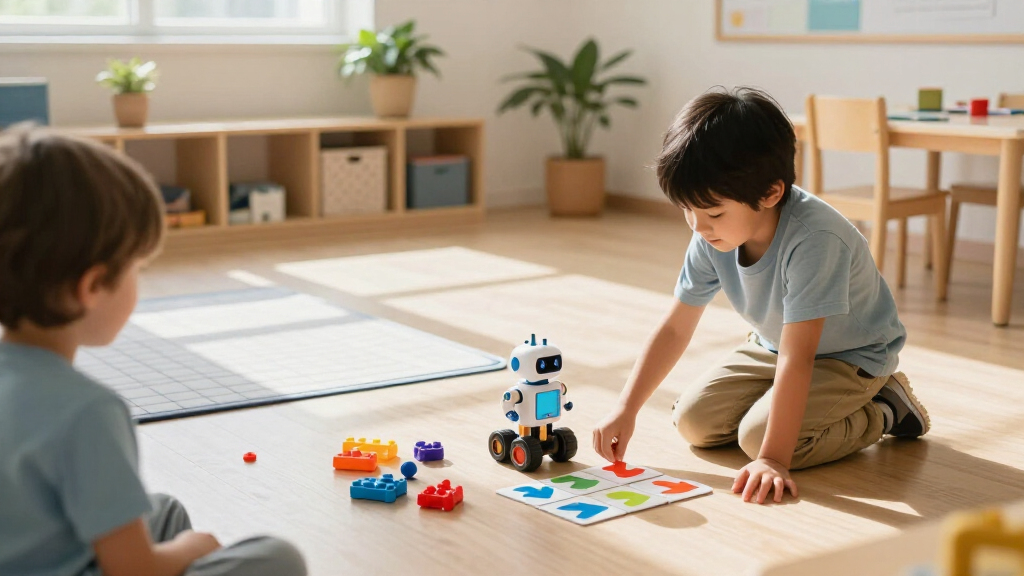
I compared these robots by how clearly they connect play to coding concepts, how much setup and reading they ask of a child, and how well their format fits the ages named in their product descriptions. I also weighed whether each option supports progression from first instructions to more involved projects, and whether it emphasizes screen-free commands, app-based coding, building, or a focused activity set. Those differences matter because a child who wants to make a robot move right away has different needs from one who wants to assemble a programmable machine.
My ranking favors approachable learning with meaningful room to progress. Dash leads for its balance of accessibility and coding scope; Botley 2.0 follows for families prioritizing screen-free play. Build-focused kits rank well for children who want assembly and deeper tinkering, but sit lower for general use because setup and age fit narrow their audience. Focused toys such as the Robot Mouse work best as first steps, while near-duplicate models are distinguished by their included activities and stated capabilities rather than treated as wholly different learning experiences.
Factors to Consider When Choosing Children’s Educational Coding Robots
Choosing a coding robot is easier when you start with how the child will use it, rather than the number of features on the box. These factors help match the robot’s learning style and setup demands to your household.
Match the Coding Method to the Learner
Robots teach coding through different interfaces, and the most advanced one is not automatically the best fit. Physical command cards or buttons make sequences visible and can help a young learner grasp order and cause and effect. App-based block coding gives children a path toward loops, events, and more complex instructions, but it adds a screen and may require device setup. Building kits introduce another layer: children may spend substantial time assembling before writing a program. Choose the method the child is likely to return to, rather than buying for a learning stage they have not reached.
Check the Full Age and Adult-Help Picture
Age labels provide a starting point, but they do not tell you how much reading, patience, or fine-motor work a particular child will need. A screen-free activity set can still frustrate a child if its instructions require extended planning, while a buildable robot may suit a younger tinkerer with an adult nearby. Before choosing, look at assembly requirements, the length of the first activity, and whether a grown-up must guide app pairing or troubleshooting. A common mistake is to buy for a child’s eventual ability and overlook the first afternoon. A good first project should feel achievable without an adult taking over.
Decide Whether Screen-Free Play Is a Priority
Screen-free robots can make commands tangible and work well where families want to limit device use. Their activities may focus on directional sequences and planned routes, so children seeking open-ended programming could outgrow them sooner. App-connected models can offer more ways to build programs, but they bring device compatibility and setup into the experience. Think about when and where the robot will be used: a classroom may favor clear, repeatable group activities, while home use might benefit from flexible app projects. Check current device requirements before buying, especially if the household uses older tablets or phones.
Choose Between Ready-to-Play and Buildable
A ready-to-play robot lets the child move quickly into activities, while a construction kit makes assembly part of the learning. Building can deepen interest in how a robot works, but it also adds time, small components, and the possibility of stalled progress before coding begins. Consider whether the child enjoys following diagrams and handling parts, or mainly wants to direct a robot through challenges. For a first coding toy, a simpler ready-to-play option can reveal whether the interest lasts. For an established maker, a kit can connect programming with mechanical problem-solving.
Look for Progression, Not a Long Feature List
A robot’s learning value depends on whether its activities build from simple commands toward ideas the child can apply elsewhere. Look for a clear next step after movement and sequencing, such as repeating actions, responding to inputs, or designing a solution to a new challenge. Multiple modes or build configurations are useful only if the child can understand how they change a project. A feature-heavy kit can feel limiting if its instructions lead through fixed projects without room to experiment. Ask what the child will be able to create independently after completing the starter activities.
Compare Similar Sets by What Comes in the Box
Product families often include a base robot, an activity set, or a bundled kit, and their names can sound nearly identical. The extra materials may change how many guided challenges are available, but they do not always change the robot’s underlying coding capabilities. Compare included cards, obstacles, building parts, and project instructions, then decide which additions will see regular use. If a child already owns a compatible base model, a separate activity set may add more value than a second robot. Confirm the exact model and bundle contents before ordering, since listings can use similar names for different packages.
Frequently Asked Questions
Which coding robot is a sensible first choice for a child who has never coded?
For a child who wants a quick, hands-on start, I would compare the Botley 2.0 with the Code & Go Robot Mouse. Botley 2.0 offers a screen-free way to practice commands, while the Mouse activities focus more tightly on planning a route through a challenge. If the child is ready for an app and wants room to move beyond basic sequences, Dash is a stronger long-term candidate. Choose based on whether the child prefers open-ended exploration or clearly bounded puzzles. Keep the first activity short enough for the child to complete without adult takeover.
Should I choose a screen-free robot or an app-based coding robot?
Choose screen-free if your priority is physical commands, simple setup, and less device use; choose app-based if the child wants to build and revise more involved programs. Screen-free options such as Botley and the Robot Mouse make instruction sequences visible, though their activities may stay focused on foundational concepts. App-based choices such as Dash or mBot can extend the learning path, but depend on a compatible device and a child comfortable with its interface. Consider the device you already have and whether you want coding time to happen away from a screen. The right choice is the one that fits both the learner and your household routine.
Are building kits a better way to learn coding than ready-made robots?
Building kits teach a broader mix of skills, but they are not automatically better for learning to code. A child who enjoys construction may find the assembly process motivating and gain a useful sense of how a robot is put together. A ready-made robot can devote more of the child’s attention to commands, logic, and solving coding challenges. If the child loses interest during setup, a complex kit may delay the very learning you hoped to encourage. Consider a buildable option when assembly itself is part of the appeal, and a ready-to-play robot when coding practice is the main goal.
What should I check before buying a robot that uses an app?
Check which phones or tablets the app supports, whether the robot needs a wireless connection, and whether setup requires an account or additional steps. Confirm that the device your child will use can run the current app, rather than assuming any tablet will work. Also look at how much coding happens inside the app and whether the child can use it with limited help. An app can expand the kinds of programs a robot supports, but device friction can turn a promising activity into an adult-led task. If that sounds like a poor fit at home, a screen-free robot may be easier to use consistently.
How can I tell whether to buy a basic robot or one with room to grow?
Start with the child’s current interests and how often they return to projects that involve instructions or problem-solving. A basic robot makes sense when the goal is a low-friction introduction to directions and sequences. A model with app coding or multiple building options is more likely to suit a child already asking how to change a program or make a robot behave differently. You do not need to buy the most advanced kit to support future learning; a clear first step can reveal which direction the child prefers. Prioritize a credible next activity over a long list of modes they may never use.
Conclusion
For most families, I recommend Wonder Workshop Dash as the best overall for its balance of approachable play and room to advance. Botley 2.0 is my pick for beginners and screen-free learning, while the Code & Go Robot Mouse suits children who enjoy guided route puzzles and is a practical value choice among focused introductory activities. For a child ready to build, the Makeblock mBot is my best value among the more involved coding kits; the mBot Ranger is the premium direction for families who want a more expansive building project. Choose the Ozobot Evo for compact, line-based coding play, or the Elegoo Uno R3 Smart Robot Car when a technically curious learner wants an Arduino-oriented project and adult support is available. Match the robot to the child’s preferred way of learning, and the choice becomes much clearer.
Fall Picks
fall essentials
As an affiliate, we earn on qualifying purchases.