
This checklist is for curious beginners who want to explore coding through books, electronics, and robotics. Start with your interests: a reading-first approach, hands-on circuits, and programmable robots each offer a different way to learn.

Prime made for students and young adults
- Fast, free delivery for dorm and study essentials
- Prime Video and Amazon Music included
- Member-only deals
The sections follow those paths, with product picks where provided and general buying guidance where no product was specified. Use each section as a separate slot; you do not need every item to begin learning.
Before choosing, check what you already have and what you hope to build. Read the compatibility details for any hardware, and treat included guides or activities as part of the learning experience.
Beginner Programming Books
A beginner programming book can offer a clear place to start when you want to learn at your own pace. The listed pick, “Beginner’s Guide to Using an AI Writing Assistant (Beginner’s Guides B,” is described as an AI writing assistant guide. Check the subject before buying: the product name does not establish that it teaches programming concepts or coding exercises.
A common mistake is assuming that a beginner label means the material matches your goal. Look at the contents, sample pages, and stated prerequisites to see whether the book covers the language or skills you want to learn. Match the lessons to your intended use, such as writing code, understanding programming basics, or learning about an AI writing assistant. If you need practice, confirm that the book includes exercises or examples rather than relying on the title alone.
Also consider format and accessibility: check whether the edition works for your preferred reading device, and whether any referenced tools or resources are available to you. Verify the learning fit before treating this pick as a coding book.
What to look for:
- A contents list that explicitly covers programming topics
- Sample pages showing the teaching style
- Exercises or examples for hands-on practice
- Prerequisites suited to your current experience
- Format and resource access that fit your setup
Beginner’s Guide to Using an AI Writing Assistant (Beginner’s Guides Book 2)

This book serves as an introductory guide for beginners looking to utilize AI writing assistants. It is the second installment in the Beginner’s Guides series, focusing on practical applications of AI tools for writing.
Pros:
- Designed specifically for beginners with no prior experience
- Part of a structured series for progressive learning
- Focuses on practical application of AI writing tools
Cons:
- Content limited to introductory level concepts
- May lack advanced strategies for experienced users
- Specific tool recommendations may become outdated quickly
Best for: Readers interested in an AI writing assistant guide
Not ideal for: Learners seeking a clearly identified programming textbook
Bottom line: Check the contents and sample material to confirm it teaches the coding skills you want.
Microcontroller Boards
A microcontroller board can be the central piece of a hands-on coding project, connecting code with electronic components. No specific product is listed for this slot, so begin by defining what you want to make and which tools or parts you already own. Let the project guide the board choice, rather than picking a board based only on a broad beginner label.
Compatibility is a frequent source of frustration. Check the programming language and development environment, operating system support, connection type, and whether the board works with the sensors or accessories you plan to use. Compare the board with your existing parts, including connector types and power requirements. Avoid assuming that similarly named boards share the same software or accessory support.
For a first project, look for clear setup instructions and examples that match your intended activity. Check whether required cables, components, or software are included or need to be obtained separately. Choose for a manageable first build, with enough documentation to help you get from setup to a working project.
What to look for:
- Supported programming languages and development tools
- Operating system and connection compatibility
- Connector and accessory compatibility with planned parts
- Setup instructions and beginner examples
- What components, cables, or software are included
Electronics Breadboards
A breadboard gives you a way to arrange electronic components for a project, making it a useful companion to hands-on coding experiments. The listed pick is “Electronics Component Fun Kit with E-Book, Starter Kit with Breadboard.” Check what the kit actually includes: its name mentions a breadboard and an e-book, but does not specify the other components or their compatibility.
A common buying mistake is assuming a starter kit contains every part needed for a particular circuit. Review the included-parts list and any diagrams or instructions, then compare them with the project you plan to try. Confirm component and connection details, including whether the kit’s parts match the board or other equipment you intend to use. Check whether the e-book explains setup and projects at a level that suits you, and whether its examples require additional items.
Consider the breadboard’s layout and the kinds of projects you expect to build. If you already have components, verify that they fit and that the instructions do not rely on parts missing from the kit. Use the contents list as your guide, not the word “starter.”
What to look for:
- A complete inventory of included components
- Breadboard layout and component fit information
- Compatibility with your board and planned projects
- E-book contents, setup guidance, and project examples
- Any extra parts required by the instructions
Electronics Component Fun Kit with E-Book, Starter Kit with Breadboard, Jumper W

This electronics starter kit includes a variety of components such as a breadboard, jumper wires, LEDs, resistors, and a soldering kit, suitable for Arduino, Raspberry Pi, ESP32, and ESP8266 projects. It comes with an e-book to help beginners learn and experiment with electronic circuits.
Pros:
- Comprehensive set for electronics projects
- Includes an educational e-book
- Suitable for beginners and hobbyists
Cons:
- No specific product rating available
- Content details are limited
- Requires basic knowledge of electronics
Best for: Beginners looking for a breadboard kit with an e-book
Not ideal for: Builders who need specified parts without checking the inventory
Bottom line: Compare the included parts and e-book projects with your board and first circuit.
USB Logic Analyzers
A USB logic analyzer is a tool to consider when a project involves observing digital signals. The listed pick is “Saleae Logic Pro 16-Channel Logic Analyzer, Red.” Confirm the connection and software requirements before choosing it, since the product name alone does not describe supported systems, included accessories, or setup needs.
A common mistake is selecting a channel count without checking whether the device fits the signals and project you have in mind. Review the product documentation for supported signal types, input limits, connection details, and any required software. Match the analyzer to your hardware, including the board, cables, and probes you expect to use. Do not assume that every USB device works with every computer or development environment.
For a beginner, the setup experience matters as much as the device itself. Look for clear instructions and examples that explain how to connect safely and interpret captures. Check what accessories are supplied and whether the software can be used with your operating system. Verify the workflow before buying, especially if you have a specific board or project already planned.
What to look for:
- Operating system and software compatibility
- Supported signals and input limits in the documentation
- Connection and probe requirements for your hardware
- Included cables, probes, or other accessories
- Setup instructions and examples for interpreting captures
Saleae Logic Pro 16-Channel Logic Analyzer, Red
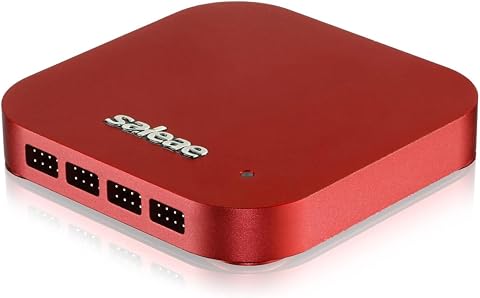
This logic analyzer provides 16 configurable digital and analog inputs, with support for SPI, I2C, and more than 23 additional protocol decoders. It captures digital signals at up to 500 MS/s and analog signals at up to 50 MS/s, and connects to Mac, Windows, and Linux systems via USB 3.0.
Pros:
- 16 configurable digital and analog inputs
- Supports a wide range of protocol decoders
- High digital and analog sampling rates
- Compact aluminum design for portability
Cons:
- Captures depend on PC memory
- Requires a USB 3.0 connection
Best for: Learners investigating digital signals in projects
Not ideal for: Beginners whose projects do not call for signal analysis
Bottom line: Check software, connection, and signal compatibility with your planned hardware.
Programmable Robot Kits
A programmable robot kit can make code feel tangible by tying programming activities to a physical build. The listed pick is “BirdBrain Technologies Hummingbird Bit Premium Robotics Kit.” Check the kit’s contents and requirements to understand what robot parts, controller, and other materials are provided; the product name does not specify those details.
A common mistake is assuming a robotics kit will work with a learner’s computer or preferred coding environment without setup. Review the supported devices, software, languages, and any required accounts or connections. Confirm compatibility before choosing, especially if the kit is for a child or a shared classroom computer. Check whether building materials or batteries are included, and whether the activities require additional supplies.
Think about the kind of projects and guidance that will keep the learner engaged. Look for an activity list, clear assembly steps, and a progression that suits the learner’s experience. Consider whether the kit supports solo exploration or collaborative work based on how it will be used. Choose a kit with usable instructions and a setup path that fits the learner and available equipment.
What to look for:
- Included robot components and any additional materials needed
- Supported devices, software, and programming languages
- Connection, account, or setup requirements
- Assembly guidance and example activities
- Whether instructions suit the learner’s experience
BirdBrain Technologies Hummingbird Bit Premium Robotics Kit

This robotics kit uses a micro:bit controller, lights, sensors, and motors to help learners build and program creative robots from everyday materials. It supports block-based coding, Python, and Java, and is designed for beginners through advanced learners in home, school, and library settings.
Pros:
- Supports multiple coding languages and skill levels
- Includes sensors, lights, and motors for hands-on robot building
- Can be used at home, in schools, and in libraries
Cons:
- Battery holder is included, but no batteries are listed
Best for: Learners who want coding tied to robotics projects
Not ideal for: Those without compatible devices or room for a build activity
Bottom line: Confirm what comes in the kit and whether its software works with your setup.
Coding Practice Cards
Coding practice cards can offer short prompts for exploring concepts away from a screen or alongside a computer. No product is specified for this slot, so decide first how you want to use them: solo review, a guided activity, or shared practice. Choose cards for the learning moment you have in mind and the learner’s current experience.
A common mistake is choosing a deck based on its theme without checking what its activities teach. Review sample cards or the topic list for clear instructions, appropriate difficulty, and concepts that match your goals. Look for prompts that lead to practice, such as tracing steps, arranging instructions, or discussing a solution, if those activities fit your purpose. Check whether answers or guidance are included when the cards are intended for independent use.
Also consider how the cards will work with your other materials. Some prompts may assume access to a computer, a particular language, or extra supplies, so inspect the requirements before relying on them. Check the age or experience guidance and whether the deck can be used by one person or a group. Make sure the format fits the learner and the setting where practice will happen.
What to look for:
- Sample cards or a clear topic list
- Instructions and difficulty suited to the learner
- Activities aligned with the skills you want to practice
- Answer guidance for independent use, if needed
- Any computer, language, or material requirements
Build your checklist in a practical order: start with a learning resource that clearly matches your goal, then choose a first project and verify the board and components it needs. Check compatibility before assembling a kit, and add a logic analyzer or robotics activities when they support the projects you want to try.
You can begin with one well-matched resource and expand as your interests develop. Keep the first step manageable, follow the setup guidance, and let each project help you decide what to explore next.
Black Friday Picks

Vitamix 5200 Blender with 64 oz. Container, Black
As an affiliate, we earn on qualifying purchases.