🔍 Read the full analysis: 8 High Refresh Gaming Monitors That Make Play Feel More Responsive on ThorstenMeyerAI.com

Prime made for students and young adults
- Fast, free delivery for dorm and study essentials
- Prime Video and Amazon Music included
- Member-only deals
TL;DR
A buyer’s guide from ThorstenMeyerAI.com compares eight high-refresh gaming monitors, from MSI’s 4K, 320Hz model to compact 1080p displays and ultrawide options. The guide emphasizes that resolution, panel type and screen size matter alongside refresh rate, and that a monitor’s maximum refresh rate does not mean a PC can produce matching frame rates.
ThorstenMeyerAI.com has published a comparison of eight high-refresh gaming monitors, ranging from a 4K model rated for up to 320Hz to 1080p displays designed for less demanding graphics workloads. The guide says buyers should match resolution and refresh rate to their PC, games and viewing setup rather than choosing by the largest refresh-rate figure alone.
According to the ThorstenMeyerAI.com guide, the MSI MAG 272URDFA E16 is its best overall pick, combining 4K resolution and 320Hz refresh. The guide cautions that this specification does not mean a gaming PC will deliver 320 frames per second at 4K; it says demanding games at higher resolutions place more load on the graphics card. For more high-refresh gaming monitor options, see the related guide.
The guide presents the AOC Q27G41ZE as a middle ground: a 27-inch QHD screen with a 240Hz native refresh rate and an overclocked 260Hz mode. It identifies the Samsung Odyssey OLED G6 as a panel-technology alternative, using QD-OLED rather than competing solely on refresh rate. The source does not provide direct comparative test results for image quality or response times. Readers interested in that panel type can explore OLED gaming monitors.
For other sizes and formats, the guide lists the ASUS VG259QM5A and Dell SE2426HG as 24-inch-class 1080p choices; a Sceptre 34-inch ultrawide and 32-inch SANSUI as larger-screen options; and the AOC C27G4ZH as a 27-inch curved 1080p display. The supplied guide does not include complete model specifications, prices or testing data for every pick.
The 8 picks
- 1
 Samsung 27" Odyssey OLED G6 (G61SH) QD-OLED Gaming MonitorView on Amazon →
- 2
 msi MAG 272URDFA E16 27-inch 3840 x 2160 (UHD) Gaming Office Monitor, 320Hz,…View on Amazon →
- 3
 Sceptre C345B-QU240T 34-inch Curved Ultrawide Gaming MonitorView on Amazon →
- 4
 SANSUI 32 Inch Curved 240Hz Gaming Monitor High Refresh Rate, FHD 1080PView on Amazon →
- 5
 AOC 27" Gaming Monitor QHD 240Hz Overclocked IPS NVIDIA G‑Sync Q27G41ZEView on Amazon →
- 6
 AOC C27G4ZH 27-Inch Curved FHD Gaming MonitorView on Amazon →
- 7
 ASUS TUF Gaming VG259QM5A 24.5-Inch 1080p 240Hz Gaming MonitorView on Amazon →
- 8
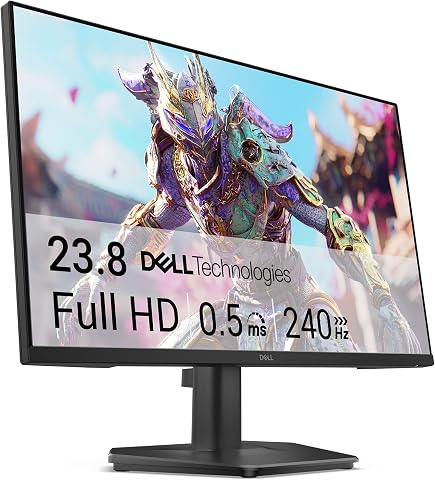 Dell 24 240Hz Gaming Monitor – SE2426HG – 23.8-inch FHD (1920×1080) 240Hz Dis…View on Amazon →
Matching Refresh Rates to Real PC Performance
The ThorstenMeyerAI.com guide argues that a high refresh-rate rating is only one part of what a player will experience. It explains that a screen can update frequently, but the PC must render enough frames to make full use of that capacity. The guide says 4K graphics demands can make very high frame rates harder to reach than at 1080p, with QHD between those resolutions in detail and rendering load.
The guide also cautions that 1080p can look less crisp on larger displays, particularly at close desk distances, even if motion appears smooth. Its recommendations address different priorities, including competitive play and lower GPU demands, higher resolution, OLED panel technology, and expansive screen formats. The source presents these as buying considerations, not results from a controlled review.
Popular right now

Dyson HushJet Compact Air Purifier, White/Silver

Ninja Luxe Café Premier 3-in-1 Espresso, Drip Coffee, and Cold Brew Machine
Dyson Car+Boat Cordless Handheld Vacuum
As an affiliate, we earn on qualifying purchases.
Eight Formats, Different Gaming Priorities
ThorstenMeyerAI.com says its guide ranked displays by how refresh rate, resolution and screen format work together, while also considering panel type, adaptive-sync support where specified, connectivity and adjustment features. The guide says it does not assume features when product details do not list them. The supplied material, however, does not give a full specification table or explain the scoring behind each ranking.
The guide’s central distinction is between a display’s capability and a system’s output. It explains that refresh rate measures how often the monitor can update; it does not guarantee that a game or graphics card will deliver the same number of frames. The guide also notes that a curved or ultrawide display can suit some games and desk setups better than others, while game support for ultrawide formats varies.
Missing Tests, Prices and Full Specifications
The supplied ThorstenMeyerAI.com source material does not state when the guide was published, what prices were checked, or whether each model remains available. It also provides no benchmark results, measured response times, brightness figures or side-by-side image-quality tests. Accordingly, the rankings are the guide’s editorial recommendations, not verified comparative performance results in the supplied material.
The source material leaves some product details incomplete, including exact specifications for several models and which adaptive-sync, connectivity or adjustment features each supports. It does not identify a testing method or say whether the author evaluated the displays directly. Those omissions make it difficult to compare value or validate relative performance claims from the supplied information alone.
Check Current Specs Before Buying
The ThorstenMeyerAI.com guide advises readers to check how their actual games perform on their graphics card and to consider desk depth, viewing distance and game support for ultrawide screens. It also recommends confirming current prices, availability, native and overclocked refresh modes, adaptive-sync compatibility and connection requirements in manufacturer listings or retailer specifications.
The supplied source material announces no follow-up testing or updated ranking. Until one is provided, the practical next step is to compare each monitor’s full specification sheet against a PC’s expected frame rates and the player’s preferred screen size and resolution.
Key Questions
Which monitor does the guide rank as its best overall pick?
The ThorstenMeyerAI.com guide names the MSI MAG 272URDFA E16, citing its combination of 4K resolution and a listed 320Hz refresh rate. The guide also warns that reaching high frame rates at 4K requires a capable graphics card.
What is the guide’s QHD option?
The guide describes the AOC Q27G41ZE as a 27-inch QHD monitor with a 240Hz native refresh rate and an overclocked 260Hz mode. The overclocked figure is an additional mode, not the native refresh rate.
Does a 320Hz monitor make games run at 320 frames per second?
No. The guide explains that a monitor’s refresh rate describes how often its display can update; the PC and game must produce the frames. The frame rate a player gets depends on the hardware, settings and game.
Why might a player choose 1080p over 4K?
1080p is generally less demanding to render than 4K, which can help a system reach higher frame rates in supported games. The guide notes the tradeoff is lower image detail, especially on a larger screen viewed from nearby.
Source: ThorstenMeyerAI.com